Dashboard CSV log format
This chapter as a clean, readable HTML page.
The “Dashboard CSV log format” chapter of the Interfaces and Protocols, reproduced as a real HTML page. Anything unclear? Open the original PDF of just this chapter (pages 111-126) (also pinned top-left). Hub: all chapters.
Format of csv log file (dashboard version V7.000+)
In the csv log file for dashboard versions V7.000+ each event is recorded to the log as one CSV line, and different events correspond to different formats of the line. At the same time, starting of the line is equal for all types of the line.
Here is the example of several lines from the csv log file:
T2021_11_04__173001_581,user,41,17,14,4.675,2.714,0.250,2,975,100
T2021_11_04__173001_581,user,41,17,15,4.665,2.708,0.250,2,975,114
T2021_11_04__173001_581,user,41,17,26,4.073,1.987,0.250,2,3462,128
T2021_11_04__173001_581,user,41,17,27,4.075,1.987,0.250,2,3462,141
T2021_11_04__173001_581,user,41,17,28,3.588,1.979,0.250,2,3496,155
T2021_11_04__173001_581,user,41,17,29,3.592,1.978,0.250,2,3496,169
T2021_11_04__173001_701,user,43,15,nl
T2021_11_04__173001_728,user,43,27,nl
T2021_11_04__173001_756,user,43,29,nl
Common part of the line includes first 3 fields:
“T2021_11_04__173001_581” – timestamp for data from this line: 2021.11.04, 17:30:01.581;
“user” – user name (reserved for future_. In future versions dashboard will support logging in users;
“41” – ID of the line type. Different line types have different formats in following fields.
There are some common special codes in data fields:
“nl” – no license. Some license is required for this field to be filled;
“na” – not applicable. No relevant data for this field. For example if mobile beacon was not successfully located, fields for X,Y,Z coordinates will contain “na”.
Next chapters contain descriptions of different types of the lines.
Line type ID 01 – link to map file
This line is recorded when map file is saved automatically or by ‘Save map’ button pressed by user.
Fields of the line:
N | Field description |
0 | Timestamp (common field) |
1 | User name (common field) |
2 | 01 – Line type ID (link to map file) |
3 | Name of the map file saved at that moment |
Line type ID 41 – Marvelmind protocol streaming record
This line is recorded when modem protocol setting in ‘Interfaces’ section is ‘Marvelmind’.
Marvelmind protocol has different types of records, and they correspond to different lines in log file, described in following sub chapters.
Hedgehog position (41 17) or (41 129)
Fields of the line:
N | Field description |
0 | Timestamp (common field) |
1 | User name (common field) |
2 | 41 – Line type ID (Marvelmind protocol streaming) |
3 | 17 (0x0011) – data code for hedgehog position 129 (0x0081) – data code for hedgehog position (with real-time timestamp streaming) |
4 | Hedgehog address |
5 | Hedgehog X coordinate, meters |
6 | Hedgehog Y coordinate, meters |
7 | Hedgehog Z coordinate, meters |
8 | Flags: Bit 0: 1 – coordinates unavailable. Data from fields X,Y,Z should not be used. Bit 1…6: reserved Bit 7: – 1 – out of geofencing zone |
9 | Yaw angle and flags: Bit 0…11: yaw angle of hedgehogs pair, decidegrees (0…3600) Bit 12: 1 – coordinates are given for center of beacons pair; 0 – coordinates for specified hedgehog |
10 | Time shift, ms. Time passed from ultrasound emission to calculation of the location in this line |
Stationary beacon position (41 18)
Fields of the line:
N | Field description |
0 | Timestamp (common field) |
1 | User name (common field) |
2 | 41 – Line type ID (Marvelmind protocol streaming) |
3 | 18 (0x0012) – data code for stationary beacon position |
4 | Stationary beacon address |
5 | Beacon X coordinate, meters |
6 | Beacon Y coordinate, meters |
7 | Beacon Z coordinate, meters |
8 | Reserved field |
Raw distances from hedgehog to stationary beacons (41 4) or (41 132)
Fields of the line:
N | Field description |
0 | Timestamp (common field) |
1 | User name (common field) |
2 | 41 – Line type ID (Marvelmind protocol streaming) |
3 | 4 (0x0004) – data code for raw distances 132 (0x0084) – data code for raw distances (with real-time timestamp streaming) |
4 | Address of hedgehog |
5 | N – number of distances in the line |
6 | N distance sub records (2*N fields), see below |
6+N*2+1 | Time shift, ms. Time passed from ultrasound emission to measurement of the distances |
Fields of the distance sub record:
0 | Address of stationary beacon |
1 | Distance to stationary beacon |
Raw IMU data (41 3) or (41 131)
This line requires MMSW0005 license.
Fields of the line:
N | Field description |
0 | Timestamp (common field) |
1 | User name (common field) |
2 | 41 – Line type ID (Marvelmind protocol streaming) |
3 | 3 (0x0003) – data code for raw IMU data 131 (0x0083) – data code for raw IMU data (real-time timestamps enabled for hedgehog) |
4 | Address of hedgehog |
5 | Accelerometer, X axis, 1 mg/LSB |
6 | Accelerometer, Y axis, 1 mg/LSB |
7 | Accelerometer, Z axis, 1 mg/LSB |
8 | Gyroscope, X axis, 0.0175 dps/LSB |
9 | Gyroscope, Y axis, 0.0175 dps/LSB |
10 | Gyroscope, Z axis, 0.0175 dps/LSB |
11 | Compass, X axis, 1100 LSB/Gauss |
12 | Compass, Y axis, 1100 LSB/Gauss |
13 | Compass, Z axis, 980 LSB/Gauss |
IMU fusion data (41 5) or (41 133)
This line requires MMSW0005 license.
Fields of the line:
N | Field description |
0 | Timestamp (common field) |
1 | User name (common field) |
2 | 41 – Line type ID (Marvelmind protocol streaming) |
3 | 5 (0x0005) – data code for IMU fusion data 133 (0x0085) – data code for IMU fusion data (real-time timestamps enabled for hedgehog) |
4 | Address of hedgehog |
5 | Coordinate X of beacon (fusion), meters |
6 | Coordinate Y of beacon (fusion), meters |
7 | Coordinate Z of beacon (fusion), meters |
8 | W field of rotation quaternion |
9 | X field of rotation quaternion |
10 | Y field of rotation quaternion |
11 | Z field of rotation quaternion |
12 | Velocity X of beacon (fusion), mm/s |
13 | Velocity Y of beacon (fusion), mm/s |
14 | Velocity Z of beacon (fusion), mm/s |
15 | Acceleration X of beacon, mm/s2 |
16 | Acceleration Y of beacon, mm/s2 |
17 | Acceleration Z of beacon, mm/s2 |
Telemetry data (41 6)
Fields of the line:
N | Field description |
0 | Timestamp (common field) |
1 | User name (common field) |
2 | 41 – Line type ID (Marvelmind protocol streaming) |
3 | 6 (0x0006) – data code for telemetry data |
4 | Address of the beacon |
5 | Supply voltage, V |
6 | RSSI, dBm |
Quality and extended location data (41 7)
Fields of the line:
N | Field description |
0 | Timestamp (common field) |
1 | User name (common field) |
2 | 41 – Line type ID (Marvelmind protocol streaming) |
3 | 7 (0x0007) – data code for quality and extended location data |
4 | Address of the hedgehog |
5 | Quality of the location, % |
6 | Number of the geofencing zone (this field requires MMSW0005 license) |
Line type ID 42 – NMEA0183 streaming record
This line requires MMSW0005 license.
This line is recorded when modem protocol setting in ‘Interfaces’ section is ‘NMEA0183’.
Fields of the line:
N | Field description |
0 | Timestamp (common field) |
1 | User name (common field) |
2 | 42 – Line type ID (NMEA0183 protocol streaming) |
3 | Address of the hedgehog |
4,5, etc | Sequence of fields according to NMEA0183 format (NMEA0183 record has also comma separated values format) |
Line type ID 43 – user payload data transmitted through the hedgehog
This line requires MMSW0005 license.
This line is recorded if hedgehog has non-zero payload data size enabled in the interfaces section of settings, and user device transmits any data via USB or UART of the hedgehog.
Also, payload data are available for some Marvlemind devices, for example robots v100 and Boxie.
Fields of the line:
N | Field description |
0 | Timestamp (common field) |
1 | User name (common field) |
2 | 43 – Line type ID (user payload) |
3 | Address of the hedgehog |
4,5, etc | Sequence of comma separated bytes of payload data (each field is 1 byte) |
Payload telemetry data for Robot v100
General format of the line corresponds to user payload data format.
Data bytes (starting from fourth field of the line) form data records with formats described below.
Multibyte values are placed starting from low byte (little endian format).
Robot v100 telemetry Record N3:
Offset | Size (bytes) | Type | Description | Value |
0 | 2 | uint16_t | Record ID | 0x3003 |
2 | 2*12 | Distances by 12 lidars (2 bytes per lidar) Each lidar data has following format: Bit 0…11 – distance by the lidar, mm Bit 12…15 – distance measurement status Status = 0 – distance is measured Status <> 0 – distance is not measured | ||
26 | 1 | uint8_t | General lidars status: Bit0: 1 – lidars read successfully 0 – lidars read failed Bit 1…7 – reserved (0) | |
27 | 1 | uint8_t | Robot state: 0: Robot is normally stopped 1: Robot is stopped by any alarm 2: Robot is autonomously moving 3: Robot is charging | |
28 | 1 | uint8_t | RV – Robot battery voltage. V= (RV/10) + 20 Volts | |
29 | 2 | int16_t | Robot supply current, x10 mA If the value is negative, robot battery is charging by this current. | N |
31 | 1 | uint8_t | Remained battery capacity, % | |
32 | 2 | uint16_t | Robot supply power, Watt | |
34 | 2 | uint16_t | Speed of left wheel, mm/s | |
36 | 2 | uint16_t | Speed of right wheel, mm/s | |
37 | 1 | uint8_t | Power on left motor, % | |
38 | 1 | uint8_t | Power on right motor, % | |
39 | 2 | uint16_t | Desired speed, mm/s | |
41 | 2 | int16_t | Robot X coordinate, cm | |
43 | 1 | uint8_t | Status flags: Bit 0…3 – reserved Bit 4: 1 – ultrasonic tracking error Bit 5…7 – reserved | |
44 | 2 | int16_t | Robot Y coordinate, cm |
Robot v100 telemetry Record N4:
Offset | Size (bytes) | Type | Description | Value |
0 | 2 | uint16_t | Record ID | 0x3004 |
2 | 2*12 | Distances by 12 lidars (2 bytes per lidar) Each lidar data has following format: Bit 0…11 – distance by the lidar, mm Bit 12…15 – distance measurement status Status = 0 – distance is measured Status <> 0 – distance is not measured | ||
26 | 1 | uint8_t | General lidars status: Bit0: 1 – lidars read successfully 0 – lidars read failed Bit 1…7 – reserved (0) | |
27 | 1 | uint8_t | Robot state: 0: Robot is normally stopped 1: Robot is stopped by any alarm 2: Robot is autonomously moving 3: Robot is charging | |
28 | 1 | uint8_t | Index of current item in movement program | |
29 | 1 | uint8_t | Total number of items in movement program | |
30 | 1 | uint8_t | Reserved | |
31 | 1 | uint8_t | Direction of obstacle by lidars: 0 – none 1 – forward 2 – left 3 – right | |
32 | 1 | uint8_t | Minimum alarm distance by lidar, x2 cm | |
33 | 1 | uint8_t | Current measured lidar distance caused the alarm, x2 cm | |
34 | 3 | Reserved | ||
36 | 2 | int16_t | Robot X position, cm | |
38 | 2 | int16_t | Robot Y position, cm |
Payload telemetry data for Robot Boxie
General format of the line corresponds to user payload data format.
Data bytes (starting from fourth field of the line) form data records with formats described below.
Multibyte values are placed starting from low byte (little endian format).
Robot Boxie telemetry Record N1:
Offset | Size (bytes) | Type | Description | Value |
0 | 2 | uint16_t | Record ID | 0x3101 |
2 | 2*12 | Distances by 12 lidars (2 bytes per lidar) Each lidar data has following format: Bit 0…11 – distance by the lidar, mm Bit 12…15 – distance measurement status Status = 0 – distance is measured Status <> 0 – distance is not measured | ||
26 | 1 | uint8_t | General lidars status: Bit0: 1 – lidars read successfully 0 – lidars read failed Bit 1…7 – reserved (0) | |
27 | 1 | uint8_t | Robot state: 0: Robot is normally stopped 1: Robot is stopped by any alarm 2: Robot is autonomously moving 3: Robot is charging | |
28 | 1 | uint8_t | RV – Robot battery voltage, x100 mV. For example, value 118 means 11.8 V | |
29 | 2 | int16_t | Robot supply current, x10 mA For example, value 123 means 1.230 A | |
31 | 1 | uint8_t | Reserved | |
32 | 1 | uint8_t | Power on left motor, % | |
33 | 1 | uint8_t | Power on right motor, % | |
34 | 2 | uint16_t | Speed of left wheel, mm/s | |
36 | 2 | uint16_t | Speed of right wheel, mm/s | |
37 | 2 | int16_t | Passed path by odometry of left motor, cm | |
39 | 2 | int16_t | Passed path by odometry of right motor, cm | |
41 | 2 | int16_t | Robot X coordinate, cm | |
43 | 1 | uint8_t | Status flags: Bit 0…1 – reserved Bit 2: 1 – movement program is executing Bit 3: 1 – movement is paused Bit 4: 1 – ultrasonic tracking error Bit 5…7 – reserved | |
44 | 2 | int16_t | Robot Y coordinate, cm |
Robot Boxie telemetry Record N3:
Offset | Size (bytes) | Type | Description | Value |
0 | 2 | uint16_t | Record ID | 0x3103 |
2 | 2 | int16_t | Current “P” value of angle control PID regulator | |
4 | 2 | int16_t | Current “I” value of angle control PID reglator | |
6 | 2 | int16_t | Current “D” value of angle control PID regulator | |
8 | 2 | int16_t | Robot X coordinate, calculated using EKF filter, cm | |
10 | 2 | int16_t | Robot Y coordinate, calculated using EKF filter, cm | |
12 | 2 | int16_t | Reserved | |
13 | 1 | uint8_t | General lidars status: Bit0: 1 – lidars read successfully 0 – lidars read failed Bit 1…7 – reserved (0) | |
14 | 1 | uint8_t | Robot state: 0: Robot is normally stopped 1: Robot is stopped by any alarm 2: Robot is autonomously moving 3: Robot is charging | |
15 | 1 | uint8_t | Index of current movement step (first waypoint is 0, second is 1 etc) | |
16 | 1 | uint8_t | Total movement steps in current program | |
17 | 1 | uint8_t | Movement flags: Bit 0: 1 – “Run forever” option Bit 1…7 – reserved | |
18 | 1 | uint8_t | 0 – No alarm by lidar 1…12 – Index of the lidar, caused the alarm | |
19 | 1 | uint8_t | Minimum alarm distance by lidar, x2 cm | |
20 | 1 | uint8_t | Current measured lidar distance caused the alarm, x2 cm | |
21 | 2 | int16_t | Angle by paired beacons on the robot, degrees | |
23 | 1 | uint8_t | Desired speed of the robot (user setting), cm/s | |
24 | 2 | int16_t | Robot X coordinate, cm | |
26 | 2 | int16_t | Robot Y coordinate, cm | |
28 | 2 | int16_t | Reserved | |
30 | 2 | int16_t | Reserved | |
32 | 2 | int16_t | Deviation angle between desired direction and current orientation of the robot, degrees | |
34 | 1 | uint8_t | Reserved | |
35 | 2 | int16_t | Fused robot orientation angle, degrees | |
36 | 5 | 5 bytes | Reserved |
Line type ID 44 – dashboard real-time player location
This line requires MMSW0005 license.
This line is recorded for hedgehog if real-time player is enabled. Real-time player provides 100 Hz location data.
Fields of the line:
N | Field description |
0 | Timestamp (common field) |
1 | User name (common field) |
2 | 44 – Line type ID (real-time player location) |
3 | Address of the hedgehog |
4 | Reserved field |
5 | Hedgehog X coordinate, meters |
6 | Hedgehog Y coordinate, meters |
7 | Hedgehog Z coordinate, meters |
Line type ID 55 – short beacon telemetry
This line contains beacon telemetry received from SSM (Super Super-Modem) .
Fields of the line:
N | Field description |
0 | Timestamp (common field) |
1 | User name (common field) |
2 | 55- Line type ID (short telemetry) |
3 | Address of the beacon |
4 | Low byte of the beacon power voltage: V0 |
5 | High byte of the beacon power voltage: V1 Beacon power voltage is V= V0+V1*256 mV |
6 | RSSI in 2’s complement code: R0 If R0 is less than 128, RSSI= R0 dBm If (R0 >= 128) RSSI= R0-256 dBm |
7 | Reserved |
8 | Reserved |
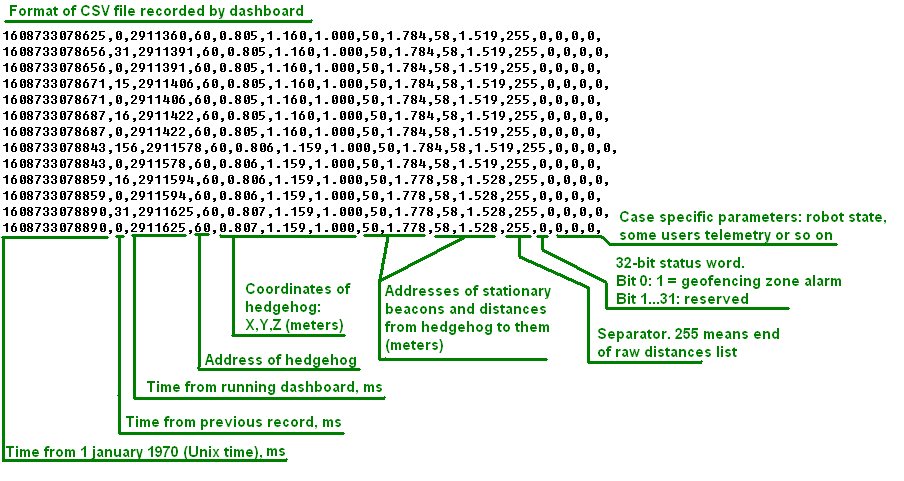
Previous format of csv log (dashboard before V7.000 or modem HW v4.9)
Marvelmind API
Marvelmind API library is used by Marvelmind Dashboard software and provides interface to user’s software. API is coming as dynamic-link library (DLL) for MS Windows and shared library for Linux (x86 and ARM platforms). The API connects to the modem via USB (virtual serial port) and implements the communication protocol with modem.
In addition to the API library, the software package includes C example software, which was used for testing of the API and includes calls of all API functions.
The example can be used as a basis for developing of a user’s software and for porting API library interface (file ‘marvelmind_api.c’) to other programming languages.
Tested on:
- MS Windows 10; CPU: Intel Core i5
- Ubuntu 20.04; CPU: Intel Core i5
- Raspbian (2018-11-13-raspbian-stretch-full); Platform: Raspberry Pi 3 Model B+
Installation for Windows
- Download Marvelmind API software package. Copy Dashboard API and example software to directory that you will use for the program. Beacons the Windows version of the example is coming with prebuilt executable file, you can immediately run ‘mm_api_example.exe’ from the ‘windows’ directory coming in API software package.
Installation for Linux
- Download Marvelmind API software package. Copy Dashboard API to directory that you will use for the program. Note the Linux version is provided for two hardware platforms: x86 (most of laptops based on Intel or AMD CPU) and arm (for example, single-board computers like Raspberry PI)
- Copy library libdashapi.so corresponding to your platform to the directory /usr/local/lib by executing command sudo cp libdashapi.so /usr/local/lib in terminal opened in directory with libdashapi.so. After that, execute sudo ldconfig in terminal.
- May be, you will need to give rights for your user to access serial port by adding him to dialout group:
- Execute in terminal: sudo adduser $USER dialout
- Add to the directory /etc/udev/rules.d file “99-tty.rules” with following content:
#Marvelmind serial port rules
KERNEL==”ttyACM0”,GROUP=”dialout”,MODE=”666”
- Build the example software – execute ‘make all’ in terminal opened in ‘source’ directory coming with the package
- Run the example by typing ‘./mm_api_example’ in terminal