
Marvelmind API
This chapter as a clean, readable HTML page.
The “Marvelmind API” chapter of the Interfaces and Protocols, reproduced as a real HTML page. Anything unclear? Open the original PDF of just this chapter (pages 127-213) (also pinned top-left). Hub: all chapters.
Check connection to API
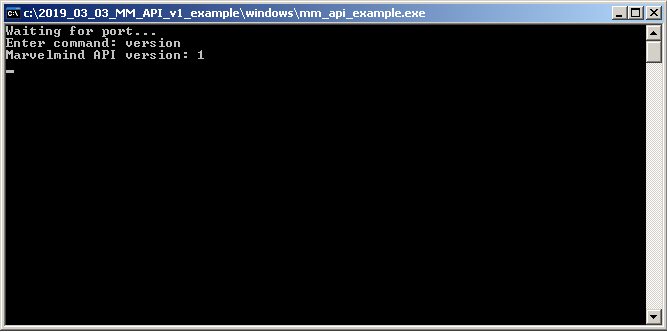
After running example software, press “space” button in terminal, type command ‘version’ and press enter. If the example software prints version of API, it can communicate with API library.
Marvelmind API library description
API is coming as dynamic-link library (DLL) for MS Windows and shared library for Linux (x86 and ARM platforms). The library includes set of functions for monitoring and controlling Marvelmind system via modem connected to USB port of the computer. This section of document contains description of all these functions.
To provide more compatibility with different programming languages, most of complex data structures are passing via untyped pointers to memory. Functions description include offset of every data field in the memory pool. In the file ‘marvelmind_api.c’ from the example software you can see implementation of moving data between memory pools and fields in C structures.
Types of parameters in the description are shown in C syntax. Here is description of the types:
Type | Size (bytes) | Description |
bool | 1 | Boolean type. Zero means false, non-zero means true |
uint8_t | 1 | Unsigned integer value, 0…255 |
int8_t | 1 | Signed integer value in two’s complement format, -128…127 |
uint16_t | 2 | Unsigned integer value, 0…65535 |
int16_t | 2 | Signed integer value in two’s complement format, -32768…32767 |
uint32_t | 4 | Unsigned integer value, 0…4294967295 |
int32_t | 4 | Signed integer value in two’s complement format, -2147483648…2147483647 |
void * | 4/8 | Memory pointer (address in memory). 4 bytes for 32-bit platforms, 8 bytes for 64-bit platforms. |
Each function description includes set of API versions where this function is available. New API versions will support more functions for new features in Marvelmind system. Now not all features available in Dashboard are available via API, so if you need more API functions please ask at info@marvelmind.com.
List of supported functions:
Function | API versions | License needed |
V1+ | none | |
V6+ | none | |
V1+ | none | |
V2+ | none | |
V9+ | none | |
V1+ | none | |
V1+ | none | |
V1+ | none | |
V1+ | none | |
V1+ | none | |
V1+ | none | |
V1+ | none | |
V3+ | none | |
V3+ | ||
V4+ | ||
V1+ | none | |
V4+ | none | |
V4+ | ||
V4+ | none | |
V4+ | ||
V1+ | none | |
V1+ | ||
V1+ | ||
V1+ | ||
V1+ | ||
V1+ | ||
V1+ | none | |
V1+ | ||
V4+ | ||
V4+ | ||
V1+ | none | |
V1+ | ||
V1+ | ||
V1+ | ||
V2+ | ||
V3+ | ||
V3+ | ||
V3+ | none | |
V3+ | none | |
V3+ | none | |
V6+ | none | |
V6+ | ||
V6+ | none | |
V6+ | ||
V6+ | none | |
V6+ | ||
V6+ | ||
V9+ | ||
V9+ | ||
V9+ | ||
V9+ | ||
V9+ | none | |
V1+ | none | |
V1+ | none | |
V1+ | none |
Get version of Marvelmind API library
Reads version of the API library. Required to ensure the needed functions are available in this version of library.
Declaration in C: bool mm_api_version(void *pdata);
Available for API versions: V1+
License required: none
Returned value:
Type | Description |
bool | true – function successfully executed false – error in execution |
Parameters:
Type | Description |
void * | Pointer to data to be filled |
Structure of data returned via pointer.
Type | Description |
uint32_t | Version of API library |
Get last error
Reads status of last operation with API library to differ causes of the error.
Function name: mm_get_last_error
Declaration in C: bool mm_get_last_error(void *pdata);
Available for API versions: V6+
License required: none
Returned value:
Type | Description |
bool | true – function successfully executed false – error in execution |
Parameters:
Type | Description |
void * | Pointer to data to be filled |
Structure of data returned via pointer.
Type | Description |
uint32_t | Status of last operation: 0: operation successfully executed 1: communication error 2: error opening serial port 3: license is required |
Open serial port
Opens port where Marvelmind device (modem or beacon) is connected via USB (virtual serial port). You don’t need to specify serial port name, because the API searching all serial ports and checks whether it corresponds to Marvelmind device or no.
Declaration in C: bool mm_open_port ();
Available for API versions: V1+
License required: none
Returned value:
Type | Description |
bool | true – function successfully executed, port is opened false – error in execution |
Parameters: none
Open serial port by given name
Opens port where Marvelmind device (modem or beacon) is connected via USB (virtual serial port). Function tries to open port with specified name.
Function name: mm_open_port_by_name
Declaration in C: bool mm_open_port_by_name(void *pdata);
Available for API versions: V2+
License required: none
Returned value:
Type | Description |
bool | true – function successfully executed, port is opened false – error in execution |
Parameters:
Type | Description |
void * | Pointer to serial port name – sequence of ASCII characters terminated by zero (ASCIIZ) |
Open UDP port
Allows to establish communication with Super-Modem via UDP instead USB.
Function name: mm_open_port_udp
Declaration in C: bool mm_open_port_udp(void *pdata);
Available for API versions: V9+
License required: none
Returned value:
Type | Description |
bool | true – function successfully executed, UDP port is opened false – error in execution |
Parameters:
Type | Description |
void * | Pointer to the structure of UDP settings (see below) |
Structure of data by the pointer:
Type | Description |
uint16_t | UDP port to connect |
uint16_t | Timeout of communication, ms |
uint16_t | reserved |
Up to 255 bytes | IP address- sequence of ASCII characters terminated by zero (ASCIIZ) |
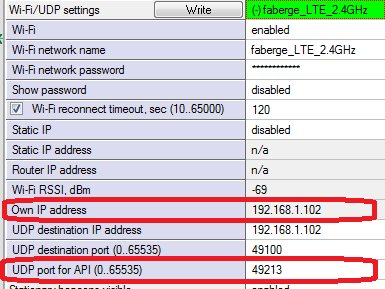
IP address and UDP port should correspond to the settings of the Super-Modem (see screenshot below).
Close serial port
Closes port, if it was previously opened by mm_open_port function.
Declaration in C: bool mm_close_port ();
Available for API versions: V1+
License required: none
Returned value:
Type | Description |
bool | true – function successfully executed, port is closed false – error in execution |
Parameters: none
Get version and CPU ID of Marvelmind device
Reads version and CPU ID. Version includes information about firmware version and type of device hardware. CPU ID is the unique ID of the device item.
Function name: mm_get_device_version_and_id
Declaration in C: bool mm_get_device_version_and_id (uint8_t address, void *pdata);
Available for API versions: V1+
License required: none
Returned value:
Type | Description |
bool | true – function successfully executed, version and CPU ID data retrieved false – error in execution |
Parameters:
Type | Description |
uint8_t | Address of Marvelmind device (1…254) |
void * | Pointer to data to be filled |
Structure of data returned via pointer:
Type | Description |
uint8_t | Major version of firmware (example: “6”, for version V6.07a) |
uint8_t | Minor version of firmware (example: “7”, for version V6.07a) |
uint8_t | Second minor version of firmware (example: “1”, for version V6.07a) |
uint8_t | Device type ID (see appendix). |
uint8_t | Firmware options (TBD). |
uint32_t | CPU ID. Printing this value as hexadecimal gives CPU ID in form shown in dashboard and on the stickers on devices. |
Get list of devices
Reads list of Marvelmind devices known to modem. The list includes list of all devices connected by radio to modem’s network, including sleeping devices.
Function name: mm_get_devices_list
Declaration in C: bool mm_get_devices_list (void *pdata);
Available for API versions: V1+
License required: none
Returned value:
Type | Description |
bool | true – function successfully executed, list of devices is retrieved false – error in execution |
Parameters:
Type | Description |
void * | Pointer to data to be filled |
Structure of data returned via pointer:
Type | Description |
uint8_t | Number of following devices in the list (N) |
N*9 bytes | Sequence of N devices structures, described in next table |
Structure of each device in the list:
Type | Description |
uint8_t | Address of device |
bool | true = duplicated address – more than 1 device with same address was found false = not duplicated address |
bool | true = device is sleeping false = device not sleeping |
uint8_t | Major version of firmware (example: “6”, for version V6.07a) |
uint8_t | Minor version of firmware (example: “7”, for version V6.07a) |
uint8_t | Second minor version of firmware (example: “1”, for version V6.07a) |
uint8_t | Device type ID (see appendix). |
uint8_t | Firmware options (TBD). |
uint8_t | Flags: Bit 0: 1 – device connection complete – device has confirmed connection 0 – waiting for confirmation from device (like ‘Connecting…’ in dashboard). Bit 1…7 – TBD |
Wake device
Sends command to wake specified device. If wake command was sent and such device is existing, the device will connect to modem in several seconds and will appear in devices list.
Declaration in C: bool mm_wake_device (uint8_t address);
Available for API versions: V1+
License required: none
Returned value:
Type | Description |
bool | true – function successfully executed, wake command was sent false – error in execution |
Parameters:
Type | Description |
uint8_t | 1…254 – address of Marvelmind device to wake 0 – wake all devices |
Send device to sleep
Send to sleep existing device.
Function name: mm_send_to_sleep_device
Declaration in C: bool mm_send_to_sleep_device (uint8_t address);
Available for API versions: V1+
License required: none
Returned value:
Type | Description |
bool | true – function successfully executed, sleep command was sent false – error in execution |
Parameters:
Type | Description |
uint8_t | 1…254 – address of Marvelmind device to sleep 0 – send to sleep all devices |
Get telemetry data from beacon
Reads telemetry data of Marvelmind beacon.
Function name: mm_get_beacon_telemetry
Declaration in C: bool mm_get_beacon_telemetry (uint8_t address, void *pdata);
Available for API versions: V1+
License required: none
Returned value:
Type | Description |
bool | true – function successfully executed, telemetry is retrieved false – error in execution |
Parameters:
Type | Description |
uint8_t | Address of Marvelmind beacon (1…254) |
void * | Pointer to data to be filled |
Structure of data returned via pointer:
Type | Description |
uint32_t | Working time of the beacon, seconds (time from reset or waking up). |
int8_t | RSSI, dBm – radio signal strength |
int8_t | Measured temperature, °C |
uint16_t | Supply voltage, mV |
16 bytes | Reserved (0) |
Get latest location data
Reads latest updated coordinates pack from modem. Also reads user payload data if available.
Function name: mm_get_last_locations
Declaration in C: bool mm_get_last_locations(void *pdata);
Available for API versions: V1+
License required: none
Returned value:
Type | Description |
bool | true – function successfully executed, location data was retrieved false – error in execution |
Parameters:
Type | Description |
void * | Pointer to data to be filled |
Structure of data returned via pointer:
Type | Description |
18*6 bytes | 6 18-byte data structures of last updated coordinates, see table below |
bool | true – new raw distances are available to read |
5 bytes | TBD |
uint8_t | User payload data size (M) |
M bytes | User payload data |
Structure of each location data item:
Type | Description |
uint8_t | Address of device (1…254) 0 – this data item is not filled |
uint8_t | Head index (TBD) |
int32_t | X coordinate, mm |
int32_t | Y coordinate, mm |
int32_t | Z coordinate, mm |
uint8_t | Status flags (TBD) |
uint8_t | Quality of positioning, 0…100% |
uint8_t | TBD |
uint8_t | TBD |
Get latest location data (with angle)
Reads latest updated coordinates pack from modem (with angle for paired beacons). Also reads user payload data if available.
Function name: mm_get_last_locations2
Declaration in C: bool mm_get_last_locations2(void *pdata);
Available for API versions: V3+
License required: none
Returned value:
Type | Description |
bool | true – function successfully executed, location data was retrieved false – error in execution |
Parameters:
Type | Description |
void * | Pointer to data to be filled |
Structure of data returned via pointer:
Type | Description |
20*6 bytes | 6 20-byte data structures of last updated coordinates, see table below |
bool | true – new raw distances are available to read |
5 bytes | TBD |
uint8_t | User payload data size (M) |
M bytes | User payload data |
Structure of each location data item:
Type | Description |
uint8_t | Address of device (1…254) 0 – this data item is not filled |
uint8_t | Head index (TBD) |
int32_t | X coordinate, mm |
int32_t | Y coordinate, mm |
int32_t | Z coordinate, mm |
uint8_t | Status flags (TBD) |
uint8_t | Quality of positioning, 0…100% |
uint8_t | TBD |
uint8_t | TBD |
uint16_t | Bit 0…11 – angle of rotation in 1/10 degree (if paired beacons feature is enabled) Bit 12 – 1 = angle not available Bit 13…15 – reserved |
Set location of the beacon
Manual setup of location of the specified beacon.
Function name: mm_set_beacon_location
Declaration in C: bool mm_set_beacon_location (uint8_t address, void *pdata);
Available for API versions: V3+
License required: MMSW0005
Returned value:
Type | Description |
bool | true – function successfully executed, location is updated false – error in execution |
Parameters:
Type | Description |
uint8_t | Address of the beacon |
void * | Pointer to buffer with location data |
Structure of data by pointer (should be filled before function call):
Type | Description |
int32_t | New X coordinate of the beacon, mm |
int32_t | New Y coordinate of the beacon, mm |
int32_t | New Z coordinate of the beacon, mm |
Set distance between beacons
Manual setup of distance between beacons.
Function name: mm_set_beacons_distance
Declaration in C: bool mm_set_beacons_distance (void *pdata);
Available for API versions: V4+
License required: MMSW0005
Returned value:
Type | Description |
bool | true – function successfully executed, distance is written false – error in execution |
Parameters:
Type | Description |
void * | Pointer to buffer with distance data |
Structure of data by pointer (should be filled before function call):
Type | Description |
uint8_t | Address of first beacon |
uint8_t | Address of second beacon |
int32_t | Distance between beacons, mm |
Get latest raw distances data
Reads latest updated raw distances pack from modem.
Function name: mm_get_last_distances
Declaration in C: bool mm_get_last_distances(void *pdata);
Available for API versions: V1+
License required: none
Returned value:
Type | Description |
bool | true – function successfully executed, raw distances data was retrieved false – error in execution |
Parameters:
Type | Description |
void * | Pointer to data to be filled |
Structure of data returned via pointer:
Type | Description |
uint8_t | Number of raw distances data items (N). Maximum number of raw distances per request is 16: N<=16 |
9*N bytes | N 9-byte data structures of last raw distances, see table below |
Structure of each raw distance data item:
Type | Description |
uint8_t | Address of ultrasonic RX device (1…254) 0 – this data item is not filled |
uint8_t | RX Head index (TBD) |
uint8_t | Address of ultrasonic TX device (1…254) 0 – this data item is not filled |
uint8_t | TX Head index (TBD) |
uint32_t | Distance from TX device to RX device, mm |
uint8_t | TBD |
Get height of the hedgehog
Returns height of mobile beacon (hedgehog).
Function name: mm_get_hedge_height
Declaration in C: bool mm_get_hedge_height (uint8_t address, void *pdata);
Available for API versions: V4+
License required: none
Returned value:
Type | Description |
bool | true – function successfully executed, height is returned false – error in execution |
Parameters:
Type | Description |
uint8_t | Address of the hedgehog |
void * | Pointer to buffer with height data |
Structure of data by pointer:
Type | Description |
int32_t | Height of the hedgehog, mm |
Set height of the hedgehog
Setup height of mobile beacon (hedgehog).
Function name: mm_set_hedge_height
Declaration in C: bool mm_set_hedge_height (uint8_t address, void *pdata);
Available for API versions: V4+
License required: MMSW0005
Returned value:
Type | Description |
bool | true – function successfully executed, height is changed false – error in execution |
Parameters:
Type | Description |
uint8_t | Address of the hedgehog |
void * | Pointer to buffer with height data |
Structure of data by pointer (should be filled before function call):
Type | Description |
int32_t | Height of the hedgehog, mm |
Get height of the stationary beacon in submap
Returns height of stationary beacon in submap.
Function name: mm_get_beacon_height
Declaration in C: bool mm_get_beacon_height (uint8_t address, void *pdata);
Available for API versions: V4+
License required: none
Returned value:
Type | Description |
bool | true – function successfully executed, height is returned false – error in execution |
Parameters:
Type | Description |
uint8_t | Address of the beacon |
void * | Pointer to buffer with height data |
Structure of data by pointer:
Type | Description |
uint8_t | Submap ID, should be filled before function call |
int32_t | Height of the beacon, mm |
Set height of the stationary beacon in submap
Setup height of stationary beacon in submap.
Function name: mm_set_beacon_height
Declaration in C: bool mm_set_beacon_height (uint8_t address, void *pdata);
Available for API versions: V4+
License required: MMSW0005
Returned value:
Type | Description |
bool | true – function successfully executed, height is changed false – error in execution |
Parameters:
Type | Description |
uint8_t | Address of the beacon |
void * | Pointer to buffer with height data |
Structure of data by pointer (should be filled before function call):
Type | Description |
uint8_t | Submap ID |
int32_t | Height of the beacon, mm |
Get location update rate setting
Reads location update rate setting from modem.
Function name: mm_get_update_rate_setting
Declaration in C: bool mm_get_update_rate_setting (void *pdata);
Available for API versions: V1+
License required: none
Returned value:
Type | Description |
bool | true – function successfully executed, update rate was retrieved false – error in execution |
Parameters:
Type | Description |
void * | Pointer to data to be filled |
Structure of data returned via pointer:
Type | Description |
uint32_t | Location update rate setting in mHz. So, 1000 is returned for 1 Hz, 16000 for 16 Hz, 50 for 0.05 Hz mode. |
Set location update rate setting
Writes location update rate setting to modem.
Function name: mm_set_update_rate_setting
Declaration in C: bool mm_set_update_rate_setting (void *pdata);
Available for API versions: V1+
License required: MMSW0005
Returned value:
Type | Description |
bool | true – function successfully executed, update rate was changed false – error in execution |
Parameters:
Type | Description |
void * | Pointer to data |
Structure of data by pointer (should be filled before function call):
Type | Description |
uint32_t | Location update rate setting in mHz. So, 1000 is returned for 1 Hz, 16000 for 16 Hz, 50 for 0.05 Hz mode. The system will use most close to specified update rate from the series: 0.05 Hz, 0.1 Hz, 0.2 Hz, 0.5 Hz, 1 Hz, 2 Hz, 4 Hz, 8 Hz, 12 Hz, 16 Hz, 16+Hz. |
Add submap
Adds new submap.
Declaration in C: bool mm_add_submap (uint8_t submapId);
Available for API versions: V1+
License required: MMSW0005
Returned value:
Type | Description |
bool | true – function successfully executed, submap was added false – error in execution |
Parameters:
Type | Description |
uint8_t | Submap ID to add (0…254) |
Delete submap
Delete existing submap.
Function name: mm_delete_submap
Declaration in C: bool mm_delete_submap (uint8_t submapId);
Available for API versions: V1+
License required: MMSW0005
Returned value:
Type | Description |
bool | true – function successfully executed, submap was removed false – error in execution |
Parameters:
Type | Description |
uint8_t | Submap ID to delete (0…254) |
Freeze submap
Freezes submap.
Function name: mm_freeze_submap
Declaration in C: bool mm_freeze_submap (uint8_t submapId);
Available for API versions: V1+
License required: MMSW0005
Returned value:
Type | Description |
bool | true – function successfully executed, submap is frozen false – error in execution |
Parameters:
Type | Description |
uint8_t | Submap ID to freeze (0…254) |
Unfreeze submap
Unfreezes submap.
Function name: mm_unfreeze_submap
Declaration in C: bool mm_unfreeze_submap (uint8_t submapId);
Available for API versions: V1+
License required: MMSW0005
Returned value:
Type | Description |
bool | true – function successfully executed, submap is unfrozen false – error in execution |
Parameters:
Type | Description |
uint8_t | Submap ID to unfreeze (0…254) |
Get submap settings
Reads submap settings from modem.
Function name: mm_get_submap_settings
Declaration in C: bool mm_get_submap_settings (uint8_t submapId, void *pdata);
Available for API versions: V1+
License required: none
Returned value:
Type | Description |
bool | true – function successfully executed, submap settings were retrieved false – error in execution |
Parameters:
Type | Description |
uint8_t | Submap ID (0…254) |
void * | Pointer to data to be filled |
Structure of data returned via pointer:
Type | Description |
uint8_t | Starting beacon trilateration |
uint8_t | Starting set of beacons, beacon 1 |
uint8_t | Starting set of beacons, beacon 2 |
uint8_t | Starting set of beacons, beacon 3 |
uint8_t | Starting set of beacons, beacon 4 |
bool | true = 3D navigation enabled |
bool | true = Submap is used only for Z coordinate |
bool | true = manual limitation distance false = auto limitation distance |
uint8_t | Maximum distance, meters (for manual limitation distances) |
int16_t | Submap X shift, cm |
int16_t | Submap Y shift, cm |
int16_t | Submap Z shift, cm |
uint16_t | Submap rotation, centidegrees |
int16_t | Plane rotation quaternion, W (quaternion is normalized to 10000) |
int16_t | Plane rotation quaternion, X |
int16_t | Plane rotation quaternion, Y |
int16_t | Plane rotation quaternion, Z |
int16_t | Service zone thickness, cm |
int16_t | Hedges height in 2D mode |
bool | true = submap is frozen |
bool | true = submap is locked |
bool | true = stationary beacons are higher than mobile |
bool | true = submap is mirrored |
4 bytes | List of addresses of beacons in submap (0 = none) |
8 bytes | List of ID’s of nearby submaps (255 = none) |
uint8_t | Number of service zone polygon points (P) |
P*4 bytes | List of service zone polygon points structures (see below) |
Structure of service zone polygon point:
Type | Description |
int16_t | X, cm |
int16_t | Y, cm |
Set submap settings
Writes submap settings to modem.
Function name: mm_set_submap_settings
Declaration in C: bool mm_set_submap_settings (uint8_t submapId, void *pdata);
Available for API versions: V1+
License required: MMSW0005
Returned value:
Type | Description |
bool | true – function successfully executed, submap settings were changed false – error in execution |
Parameters:
Type | Description |
uint8_t | Submap ID (0…254) |
void * | Pointer to data to be written (see ‘get submap settings’ function). |
Freeze map
Freezes submap.
Function name: mm_freeze_map
Declaration in C: bool mm_freeze_map ();
Available for API versions: V4+
License required: MMSW0005
Returned value:
Type | Description |
bool | true – function successfully executed, map is frozen false – error in execution |
Unfreeze map
Freezes submap.
Function name: mm_unfreeze_map
Declaration in C: bool mm_freeze_map ();
Available for API versions: V4+
License required: MMSW0005
Returned value:
Type | Description |
bool | true – function successfully executed, map is unfrozen false – error in execution |
Get ultrasonic settings of the beacon
Reads ultrasonic settings from specified beacon.
Function name: mm_get_ultrasound_settings
Declaration in C: bool mm_get_ultrasound_settings (uint8_t address, void *pdata);
Available for API versions: V1+
License required: none
Returned value:
Type | Description |
bool | true – function successfully executed, ultrasonic settings were retrieved false – error in execution |
Parameters:
Type | Description |
uint8_t | Address of the beacon (1…254) |
void * | Pointer to data to be filled |
Structure of data returned via pointer:
Type | Description |
uint16_t | Frequency of ultrasound TX (not relevant for DSP RX-only beacons) |
uint8_t | Number of TX periods (not relevant for DSP RX-only beacons) |
bool | true= use AGC for RX false = manual gain for RX |
uint16_t | Manual gain value (0…4000) |
bool | true = Sensor RX1 is enabled in normal mode |
bool | true = Sensor RX2 is enabled in normal mode |
bool | true = Sensor RX3 is enabled in normal mode |
bool | true = Sensor RX4 is enabled in normal mode |
bool | true = Sensor RX5 is enabled in normal mode |
bool | true = Sensor RX1 is enabled in frozen mode |
bool | true = Sensor RX2 is enabled in frozen mode |
bool | true = Sensor RX3 is enabled in frozen mode |
bool | true = Sensor RX4 is enabled in frozen mode |
bool | true = Sensor RX5 is enabled in frozen mode |
uint8_t | Index of DSP RX filter (relevant only for DSP beacons) 0 = 19 kHz 1 = 25 kHz 2 = 31 kHz 3 = 37 kHz 4 = 45 kHz |
Set ultrasonic settings of the beacon
Write ultrasonic settings to specified beacon.
Function name: mm_set_ultrasound_settings
Declaration in C: bool mm_set_ultrasound_settings (uint8_t address, void *pdata);
Available for API versions: V1+
License required: MMSW0005
Returned value:
Type | Description |
bool | true – function successfully executed, ultrasonic settings were changed false – error in execution |
Parameters:
Type | Description |
uint8_t | Address of the beacon (1…254) |
void * | Pointer to data to be written (see ‘get ultrasonic settings’ function). |
Erase map
Erase map in modem – remove all submaps (except submap 0), reset submap 0 to initial state, remove all connected beacons from network.
Declaration in C: bool mm_erase_map ();
Available for API versions: V1+
License required: MMSW0005
Returned value:
Type | Description |
bool | true – function successfully executed, map erased false – error in execution |
Parameters: none
Reset device to default settings
Reset device to default settings (radio, ultrasonic etc).
Function name: mm_set_default_settings
Declaration in C: bool mm_set_default_settings (uint8_t address);
Available for API versions: V1+
License required: MMSW0005
Returned value:
Type | Description |
bool | true – function successfully executed, device was reset to default settings false – error in execution |
Parameters:
Type | Description |
uint8_t | Address of the device (1…254) 255 – reset to default the device connected via USB |
Connect beacons to axes
Shift map so selected beacons will be on axes.
Function name: mm_beacons_to_axes
Declaration in C: bool mm_beacons_to_axes (uint8_t address_0, uint8_t address_x, uint8_t address_y);
Available for API versions: V2+
License required: MMSW0005
Returned value:
Type | Description |
bool | true – function successfully executed, map shifted false – error in execution |
Parameters:
Type | Description |
uint8_t | address_0 – address of beacon which should be in the center (X=0, Y=0) |
uint8_t | address_x – address of beacon which should be along X axis (Y= 0) |
uint8_t | address_y – address of beacon which should be in positive direction of Y (Y>0) |
Read dump of modem’s configuration memory
Reads dump of modem’s configuration memory. Allows saving modem’s settings and stored map.
Function name: mm_read_flash_dump
Declaration in C: bool mm_read_flash_dump(uint32_t offset, uint32_t size, void *pdata);
Available for API versions: V3+
License required: MMSW0005
Returned value:
Type | Description |
bool | true – function successfully executed, dump was read false – error in execution |
Parameters:
Type | Description |
uint32_t | offset – offset from start of configuration memory, bytes |
uint32_t | size – size of data to read, bytes |
void * | pdata – pointer to user’s buffer for receiving data |
Write dump of modem’s configuration memory
Write data dump to modem’s configuration memory. Allows to restore modem’s settings and map.
Function name: mm_write_flash_dump
Declaration in C: bool mm_write_flash_dump(uint32_t offset, uint32_t size, void *pdata);
Available for API versions: V3+
License required: MMSW0005
Returned value:
Type | Description |
bool | true – function successfully executed, dump was written false – error in execution |
Parameters:
Type | Description |
uint32_t | offset – offset from start of configuration memory, bytes For correct operation offset should be aligned to 4096 bytes page (value 0, 4096, 8192 and so on). |
uint32_t | size – size of data to write, bytes |
void * | pdata – pointer to user’s buffer with data |
Note: After writing the configuration, software reset of the modem (mm_reset_device(255)) is recommended to apply new settings and prevent overwriting them.
Restart (soft reset) of the device
Executes software reset for specified device.
Function name: mm_reset_device
Declaration in C: bool mm_reset_device (uint8_t address);
Available for API versions: V3+
License required: none
Returned value:
Type | Description |
bool | true – function successfully executed, device is resetting false – error in execution |
Parameters:
Type | Description |
uint8_t | Address of the device (1…254) 255 -software reset for device connected via USB |
Read temperature of air setting from modem
Reads temperature of air setting (in Celsius degrees) from modem.
Function name: mm_get_air_temperature
Declaration in C: bool mm_get_air_temperature (void *pdata);
Available for API versions: V3+
License required: none
Returned value:
Type | Description |
bool | true – function successfully executed, temperature is returned false – error in execution |
Structure of data returned via pdata pointer:
Type | Description |
int8_t | Temperature of air, Celsius degrees |
Write temperature of air setting to modem
Setup temperature of air setting (in Celsius degrees) in modem.
Function name: mm_set_air_temperature
Declaration in C: bool mm_set_air_temperature (void *pdata);
Available for API versions: V3+
License required: none
Returned value:
Type | Description |
bool | true – function successfully executed, temperature was written false – error in execution |
Structure of data which user should supply via pdata pointer:
Type | Description |
int8_t | Temperature of air, Celsius degrees |
Get beacon real-time player settings
Reads real-time player settings for the beacon.
Function name: mm_get_realtime_player_settings
Declaration in C: bool mm_get_realtime_player_settings (uint8_t address, void *pdata);
Available for API versions: V6+
License required: none
Returned value:
Type | Description |
bool | true – function successfully executed false – error in execution |
Parameters:
Type | Description |
uint8_t | address – address of the beacon (1…254) |
void * | pdata – pointer to data to be filled |
Structure of data returned via pointer:
Type | Description |
bool | true = real-time player is enabled |
uint8_t | Number of real-time player forward samples to process |
uint8_t | Number of real-time player backward samples to process |
uint8_t | Reserved (0) |
uint8_t | Reserved (0) |
Set beacon real-time player settings
Setup real-time player settings for the beacon.
Function name: mm_set_realtime_player_settings
Declaration in C: bool mm_set_realtime_player_settings (uint8_t address, void *pdata);
Available for API versions: V6+
License required: MMSW0005
Returned value:
Type | Description |
bool | true – function successfully executed false – error in execution |
Parameters:
Type | Description |
uint8_t | address – address of the beacon (1…254) |
void * | pdata – pointer to data to write (see ‘Get beacon real-time player settings’ function) |
Get georeferencing settings
Reads georeferencing settings (geo location of point (X=0,Y=0) of Marvelmind map).
Function name: mm_get_georeferencing_settings
Declaration in C: bool mm_get_georeferencing_settings (void *pdata);
Available for API versions: V6+
License required: none
Returned value:
Type | Description |
bool | true – function successfully executed false – error in execution |
Parameters:
Type | Description |
void * | pdata – pointer to data to be filled |
Structure of data returned via pointer:
Type | Description |
int32_t | Latitude, x10-7 degrees |
int32_t | Longitude, x10-7 degrees |
Set georeferencing settings
Setup georeferencing settings (geo location of point (X=0,Y=0) of Marvelmind map).
Function name: mm_set_georeferencing_settings
Declaration in C: bool mm_set_georeferencing_settings (void *pdata);
Available for API versions: V6+
License required: MMSW0005
Returned value:
Type | Description |
bool | true – function successfully executed false – error in execution |
Parameters:
Type | Description |
void * | pdata – pointer to data to write (see ‘Get georeferencing settings’ function) |
Get mode of updating positions
Reads current mode of updating positions of mobile beacons.
Function name: mm_get_update_position_mode
Declaration in C: bool mm_get_update_position_mode (void *pdata);
Available for API versions: V6+
License required: none
Returned value:
Type | Description |
bool | true – function successfully executed false – error in execution |
Parameters:
Type | Description |
void * | pdata – pointer to data to be filled |
Structure of data returned via pointer:
Type | Description |
uint8_t | Mode of updating positions of mobile beacons: 0 – auto update positions (default mode) 1 – update positions by user request at next update cycle 2 – update positions by user request immediately |
7 bytes | Reserved (0) |
Set mode of updating positions
Setup mode of updating positions of mobile beacons.
Function name: mm_set_update_position_mode
Declaration in C: bool mm_set_update_position_mode (void *pdata);
Available for API versions: V6+
License required: MMSW0005
Returned value:
Type | Description |
bool | true – function successfully executed false – error in execution |
Parameters:
Type | Description |
void * | pdata – pointer to data to write (see function ‘Get mode of updating positions’) |
Command to update positions
Send command to update positions of mobile beacons (if update mode is not automatic).
Function name: mm_set_update_position_command
Declaration in C: bool mm_set_update_position_command (void *pdata);
Available for API versions: V6+
License required: MMSW0005
Returned value:
Type | Description |
bool | true – function successfully executed false – error in execution |
Parameters:
Type | Description |
void * | pdata – pointer to data to write |
Structure of data by pointer:
Type | Description |
8 bytes | Reserved (0) |
Set geofencing alarm state for the beacon
Send command to setup alarm state on the beacon’s alarm pin (for Super-Beacon).
Alarm state of the pin can be specified via ‘Alarm pin mode’ setting in the ‘Interfaces’ section of settings in the dashboard (if MMSW0006 license is activated).
Function name: mm_set_alarm_state
Declaration in C: bool mm_set_alarm_state (uint8_t address, void *pdata);
Available for API versions: V9+
License required: MMSW0005, MMSW0006
Returned value:
Type | Description |
bool | true – function successfully executed false – error in execution |
Parameters:
Type | Description |
uint8_t | address – address of the beacon (1…254) |
void * | pdata – pointer to data to write |
Structure of data by pointer:
Type | Description |
uint8_t | Alarm pin mode: 0 – pin is automatically controlled according to geofencing status 1 – pin is manually controlled – no alarm state 2 – pin is manually controlled – alarm state |
uint8_t | Geofencing zone index – number of geofencing zone which beacon will stream out in the alarm state |
6 bytes | Reserved (0) |
Send generic user payload data
Sends generic user payload data. If the API is connected to the modem, data will be transmitted via UART/USB port of the specified mobile beacon. If the API is connected to the mobile beacon, data will be transmitted via UART/USB port of the modem. Received data are available on the remote side by receiving API function, Arduino examples, ROS and other software.
Function name: mm_send_user_payload_data
Declaration in C: bool mm_send_user_payload_data (uint8_t address, void *pdata);
Available for API versions: V9+
License required: MMSW0005
Returned value:
Type | Description |
bool | true – function successfully executed false – error in execution |
Parameters:
Type | Description |
uint8_t | address – address of the beacon (1…254) if the API is connected to modem n/a if the API is connected to the beacon |
void * | pdata – pointer to data to write |
Structure of data by pointer:
Type | Description |
uint8_t | Size of data to transmit |
256 bytes | Generic data buffer to transmit |
Get generic user payload data
Receives generic user payload data, sent by transmitting API function, Arduino, ROS or other user software. If the API is connected to the modem, this function can receive data transmitted via UART/USB port of the mobile beacon. If the API is connected to the mobile beacon, this function can receive data transmitted via the modem.
Function name: mm_get_user_payload_data
Declaration in C: bool mm_get_user_payload_data (void *pdata);
Available for API versions: V9+
License required: MMSW0005
Returned value:
Type | Description |
bool | true – function successfully executed false – error in execution |
Parameters:
Type | Description |
void * | pdata – pointer to data to receive |
Structure of received data by pointer:
Type | Description |
uint8_t | address – address of the beacon |
int64_t | Timestamp of data transmission – number of milliseconds from 01.01.1970 (Unix time) |
uint8_t | Size of data to transmit |
256 bytes | Buffer of received data |
Send command for manual distances measurement
Sends command for measurement distances from specified beacon to other beacons in the system. In current version of software supported in IA (Inverse architecture).
Function name: mm_send_distances_measurement_command
Declaration in C: bool mm_send_distances_measurement_command (void *pdata);
Available for API versions: V9+
License required: MMSW0011
Returned value:
Type | Description |
bool | true – function successfully executed false – error in execution |
Parameters:
Type | Description |
void * | pdata – pointer to data to send |
Structure of data by pointer:
Type | Description |
uint8_t | Mode: 0 – auto 1 – manual (by this command) |
uint8_t | Address of the beacon |
uint32_t | Maximum distance to measure, mm |
8 bytes | Reserved |
Get streaming data from modem
Reads modem’s streaming data in the previously described format.
Function name: mm_get_stream_data
Declaration in C: bool mm_get_stream_data (void *pdata);
Available for API versions: V9+
License required: none
Returned value:
Type | Description |
bool | true – function successfully executed false – error in execution |
Parameters:
Type | Description |
void * | pdata – pointer to data to send |
Structure of data by pointer:
Type | Description |
uint8_t | Number of stream records in this reply (0…16) |
138*16 bytes | 16 streaming records by 138 bytes (see below) |
8 bytes | Reserved |
Structure of stream record:
Type | Description |
uint8_t | Record size, bytes |
uint8_t | Record type. Same value as ‘line type’ in the dashboard log file. For example, 41 means Marvelmind protocol data |
8 bytes | Reserved |
128 bytes | Stream record data |
Check whether device type is modem
Checks whether the specified device type corresponds to modem.
Function name: mm_device_is_modem
Declaration in C: bool mm_device_is_modem (uint8_t deviceType);
Available for API versions: V1+
License required: none
Returned value:
Type | Description |
bool | true – specified device type corresponds to modem |
Parameters:
Type | Description |
uint8_t | Device type to check |
Check whether device type is stationary beacon
Checks whether the specified device type corresponds to stationary beacon.
Function name: mm_device_is_beacon
Declaration in C: bool mm_device_is_beacon (uint8_t deviceType);
Available for API versions: V1+
License required: none
Returned value:
Type | Description |
bool | true – specified device type corresponds to stationary beacon |
Parameters:
Type | Description |
uint8_t | Device type to check |
Check whether device type is hedgehog
Checks whether the specified device type corresponds to hedgehog.
Function name: mm_device_is_hedgehog
Declaration in C: bool mm_device_is_hedgehog (uint8_t deviceType);
Available for API versions: V1+
License required: none
Returned value:
Type | Description |
bool | true – specified device type corresponds to hedgehog |
Parameters:
Type | Description |
uint8_t | Device type to check |
Description of C example for Marvelmind API
C example is used for testing of Marvelmind API and can be used as basis for building of user application.
The C example is the console application. It was tested on following platforms:
- CPU: Intel Core 2 Duo, OS: MS Windows XP;
- CPU: Intel Core i5, OS: Linux Ubuntu 16.04;
- Raspberry Pi 3 Model B+, OS: Raspbian (2018-11-13-raspbian-stretch-full)
On the Windows platform the example was built with CodeBlocks IDE and so the example includes CodeBlocks project file.
On the Linux platforms, the example was built with using make utility and so the example includes makefile for this.
The example includes following modules:
File name | Description |
main.c | Module with main () function. Calls of functions of example and implements simple command line interface. |
marvelmind_example.c marvelmind_example.h | marvelmindStart() – initialization of the example marvelmindFinish() – called after finishing work with API marvelmindCycle() – frequently called from main loop Also, module includes several function for processing commands entered by user. |
marvelmind_api.c marvelmind_api.h | marvelmindAPILoad() – loads API library marvelmindAPIFree() – frees memory used by API library All functions of communication with API library. |
marvelmind_devices.c marvelmind_devices.h | Supports list of beacons retrieved from modem by calling ‘get devices list’ command. Each beacon includes data about its location and distances to other beacons. |
marvelmind_pos.c marvelmind_pos.h | Reads latest location data and latest raw distances. Updates these data in the devices list. |
marvelmind_utils.c marvelmind_utils.h | Some helper functions used by other modules. |
How the example works:
- Try to open serial port until success
- When port is opened, the program reads version of device connected via USB. If this is modem, the program continues to execute next steps
- When connected to modem, the program reads the devices list with 1 Hz rate. The devices list is compared with currently stored in marvelmind_devices.c module and the list in marvelmind_devices.c is updated, if any changes are detected. All changes are printed in console
- When connected to modem, the program reads the latest location data with 20 Hz rate. If the flag of new raw distances data is set, the program reads latest raw distances. The program compares locations and distances with data in devices list in marvelmind_devices.c and updates the data if they are changed. All changed data are printed in console
- If the program can’t get latest location data for 10 times, it closes the port and returns to step 1 – tries to open the port again. Reopening of the port is needed for cases when modem was disconnected and connected back to USB
- If user press ‘space’ button, the program shows ‘Enter command: ‘ message and waits for user command. Most of API functions are called by user command, see below for details
User commands:
If user press ‘space’ button when program is running, the program shows message ‘Enter command: ‘. User should type command on keyboard and press enter.
The table below contains format of all user commands:
Commands group | Description |
API version | Format of command: version Action: Prints version of API library |
Exit from program | Format of command: quit Action: Finishes program execution |
Sleep/wake | Format of command: wake <address> Action: Execute wake command. Examples: wake 5 – send command to wake device 5 wake 0 – send command to wake all devices |
Format of command: sleep <address> Action: Execute sending to sleep command. Examples: sleep 5 – send to sleep device 5 sleep 0 – send to sleep all devices | |
Default | Format of command: default <address> Action: Execute reset to default settings command. Examples: default 5 – set default settings for device 5 |
Read telemetry | Format of command: tele <address> Action: Reads and prints telemetry data of beacon. Examples: tele 5 – read and print telemetry of beacon 5 |
Submap commands | Format of command: submap add <submapId> Action: Execute command to add submap with specified submap ID. Example: submap add 1 – add submap 1 |
Format of command: submap delete <submapId> Action: Execute command to delete submap with specified submap ID. Example: submap delete 1 – delete submap 1 | |
Format of command: submap freeze <submapId> Action: Execute command to freeze submap with specified submap ID. Example: submap freeze 0 – freeze submap 0 | |
Format of command: submap unfreeze <submapId> Action: Execute command to unfreeze submap with specified submap ID. Example: submap unfreeze 0 – unfreeze submap 0 | |
Format of command: submap get <submapId> Action: Execute command to get settings of submap with specified submap ID. Example: submap get 0 – get and print settings of submap 0 | |
Format of command: submap testset <submapId> Action: Execute command to set settings of submap with specified submap ID. The program writes some predefined settings for testing of the command; please see the example code. Example: submap testset 0 – modify settings of submap 0 | |
Map commands | Format of command: map erase Action: Execute erase map command. Example: map erase – erase map in modem |
Format of command: map freeze Action: Execute freeze map command. Example: map freeze – freeze map | |
Format of command: map unfreeze Action: Execute unfreeze map command. Example: map unfreeze – unfreeze map | |
Update rate commands | Format of command: rate get Action: Execute reading update rate setting command. Example: rate get – read and print update rate setting |
Format of command: rate set <value> Action: Execute change update rate setting command. Value is given in Hz Example: rate set 0.5 – set update rate 0.5 Hz | |
Ultrasound commands | Format of command: usound get <address> Action: Execute reading ultrasonic settings for specified beacon. Example: usound get 5 – read and print ultrasound settings of beacon 5 |
Format of command: usound testset <address> Action: Execute writing ultrasonic settings for specified beacon. The program writes some predefined settings for testing of the command; please see the example code. Example: usound testset 5 – modify ultrasound settings of beacon 5 | |
Connect to axes command | Format of command: axes <address_0> <address_x> <address_y> Action: Execute connect beacons to axes command.. Example: axes 3 4 5 – set beacon 3 to X=0, Y=0; beacon 4 along X (Y=0) and beacon 5 above X (Y>0) |
Read configuration memory dump from modem | Format of command: read_dump <offset> <size> Action: Execute read dump of modem configuration memory command. Example: read_dump 0 1000 – read first 1000 bytes from beginning of configuration memory |
Write configuration memory test dump to modem | Format of command: write_dump_test <offset> <size> Action: Execute write dump of modem configuration memory command. Example: write_dump_test 0 1000 – fills first 1000 bytes from beginning of configuration memory by test pattern |
Software reset of device | Format of command: reset <address> Action: Execute software reset command. Example: reset 255 – executes software reset for device connected via USB |
Temperature of air commands | Format of command: temperature get Action: Execute reading temperature of air setting from modem Example: temperature get read and print ultrasound temperature of air setting |
Format of command: temperature set <value> Action: Execute writing temperature of air setting to modem Example: temperature set 30 setup temperature of air setting to 30 Celsius degrees | |
Set location of beacon | Format of command: setloc <address> <X > <Y > <Z> Action: Execute set location of the beacon command. X, Y, Z are coordinates in meters. Example: setloc 12 1.51 3.45 2.0 – sets location of beacon 12 to X= 1.51 m, Y= 3.45 m, Z= 2.0 m |
Set distance between beacons | Format of command: setdist <address1> <address2 > <distance> Action: Execute set distance between beacons command. Address1 and address2 are addresses of beacons. Distance is distance in meters. Example: setdist 12 13 16.5 – sets distance between beacons 12 and 13 to 16.5 meters |
Heights commands | Format of command: height_h get <address> Action: Execute get hedge height command. Address is the address of the hedgehog. Example: height_h get 15 – reads and prints height of hedgehog 15 |
Format of command: height_h set <address> <height> Action: Execute set hedge height command. Address is the address of the hedgehog. Height in meters Example: height_h set 15 2.5 – setup height of hedgehog 15 to 2.5 meters | |
Format of command: height_b get <address> <submap_id> Action: Execute get stationary beacon height command. Address is the address of the beacon. Submap_id is ID of submap where beacon belongs. Example: height_b get 12 0 – reads and prints height of stationary beacon 12 in submap 0. | |
Format of command: height_b set <address> <submap_id> <height> Action: Execute set stationary beacon height command. Address is the address of the hedgehog. Submap_id is ID of submap where beacon belongs. Height in meters Example: height_b set 12 0 5.1 – setup height of beacon 12 in submap 0 to 5.1 meters | |
Real-time player commands | Format of command: rtp get <address> Action: Execute get real-time player settings command. Address is the address of the beacon. Example: rtp get 15 – reads and prints real-time player settings of beacon 15 |
Format of command: rtp testset <address> Action: Execute set real-time player settings command. Address is the address of the beacon. The program writes some predefined settings for testing of the command; please see the example code. Example: rtp testset 15 – setup test real-time player settings for beacon 15 | |
Georeferencing commands | Format of command: georef get Action: Execute get georeferencing settings command. Example: georef get – reads and prints georeferencing settings |
Format of command: georef set <latitude> <longitude> Action: Execute set georeferencing settings command. Example: georef set 10 20 – write georeferencing 10 degrees latitude, 20 degrees longitude | |
Update mode commands | Format of command: update_mode get Action: Execute get positions update mode command. Example: update_mode get – reads and prints positions update mode |
Format of command: update_mode set <mode> Action: Execute set positions update mode command. Example: update_mode set 0 – set automatic mode of positions update | |
Format of command: update Action: Execute update positions command. Example: update – update positions of mobile beacons according to current mode | |
Set geofencing alarm state | Format of command: alarm <address> <mode> <zone> Action: Execute set geofencing alarm state command. Example: alarm 10 2 5 – set geofencing alarm signal on the beacon n10 with geofencing zone number 5 |
Format of command: payload read <address> Action: Execute get user payload data command. Example: payload read – read user payload from any beacon/modem Example: payload read 10 – read user payload from beacon n10 | |
Format of command: payload write <address> Action: Execute send user payload data command. Example: payload write 10 – write test payload data to beacon n10 Test pattern is 40 bytes started from 100: 100,101,…, 139 | |
Manual distance measurement command | Format of command: distance <manual/auto> <address> <max distance> Action: Execute manual distance measurement command. Example: distance manual 10 5 – measure distances from beacon 10 to others, maximum distance 5 meters Example: distance manual 10 – measure distances from beacon 10 to others, maximum distance 30 meters (default) Example: distance auto – return to automatic distances measurement mode |
Device types
Here is the list of ‘Device type ID’ values for specific devices:
Device type ID | Device description |
22 | Beacon HW V4.5 |
23 | Beacon HW V4.5 (hedgehog mode) |
24 | Modem HW V4.9 |
30 | Beacon HW V4.9 |
31 | Beacon HW V4.9 (hedgehog mode) |
32 | Beacon Mini-RX |
36 | Beacon Mini-TX |
37 | Beacon-TX-IP67 |
41 | Beacon industrial-RX |
42 | Super-Beacon |
43 | Super-Beacon (hedgehog mode) |
44 | Industrial Super-Beacon |
45 | Industrial Super-Beacon (hedgehog mode) |
46 | Super-Modem |
48 | Modem HW V5.1 |
You can get device type id from devices list and reading device version commands.
Sending user data from/to user devices
Marvelmind supports different ways for transmission user data through Marvelmind system:
- transmit data via UART or USB of the modem and receive via UART or USB from the mobile beacon
- transmit data via UART or USB of the mobile beacon and receive via UART or USB of the modem.
Super-Modem also supports transmission and receiving user data via UDP.
The protocols of the data transmission are described in previous sections of this document:
- protocol of transmission data to user device and from user device;
- API function for transmission and receiving data.
Marvelmind provides different examples of software for the communication:
Examples | Arduino (UART) | PC / Raspberry Pi (USB) | PC / raspberry Pi (UDP Super-Modem) | |||
API | C | Python | ROS/ROS2 | C example | ||
User device ← beacon | + | + | + | + | + | n/a |
Modem → User device | + | + | + | + | + | + |
User device → beacon | + | + | – | – | + | n/a |
Modem ← User device | + | + | – | – | + | + |
The full list of the examples:
- Arduino examples for sending and receiving user data are placed in the Marvelmind software package in folder ‘01_Common_Indoor_positioning_SW/ 06_Examples/ arduino’. ‘hedgehog_sample_uart_user_data_receive_v2’ is for receiving user data, ‘hedgehog_sample_uart_user_data_send_v2’ is for sending user data
- API communication example is placed in the Marvelmind software package in folder ‘01_Common_Indoor_positioning_SW/ 05_API/example_source’ (source code) and ‘01_Common_Indoor_positioning_SW/ 05_API/example_bin_win32’ (binary for Windows). Data transmission or receiving can be called as described in this document.
- C example for receiving of the streaming data is placed in the Marvelmind software package in folder ‘01_Common_Indoor_positioning_SW/ 06_Examples/ c’. Also this example is available in the repository on the GitHub. This example simply prints all data received from mobile beacon or modem, including user data.
- Python example for receiving of the streaming data is placed in the Marvelmind software package in folder ‘01_Common_Indoor_positioning_SW/ 06_Examples/ python’. Also this example is available in the repository on the GitHub. This example simply prints all data received from mobile beacon or modem, including user data.
- ROS package example for receiving of the streaming data is placed in the Marvelmind software package in folder ‘01_Common_Indoor_positioning_SW/ 06_Examples/ ROS. Also this package is available in the repository. The ROS package allows to receive user data and send user data through the API. See documentation for the details.
- ROS-2 package example for receiving of the streaming data is placed in the Marvelmind software package in folder ‘01_Common_Indoor_positioning_SW/ 06_Examples/ ROS2. Also this package is available in the repository. The ROS package allows to receive user data and send user data through the API. See documentation for the details.
- C example for receiving data via UDP is placed in the Marvelmind software package in folder ‘01_Common_Indoor_positioning_SW/ 06_Examples/ c’. This example simply prints all data received via UDP from Super-Modem or Dashboard, including user data. Sending user data via UDP can be done via API if API is used for connection to the Super-Modem via UDP instead USB.
Contacts
For additional support, please send your questions to info@marvelmind.com
Appendix 1. Calculating CRC-16
For checksum the CRC-16 is used. Last two bytes of N-bytes frame are filled with CRC-16, applied to first (N-2) bytes of frame. To check data, you can apply CRC-16 to all frame of N bytes, the result value should be zero.
Below is the implementation of the algorithm in the ‘C’:
typedef uint16_t ModbusCrc;
typedef union {
uint16_t w;
struct{
uint8_t lo;
uint8_t hi;
} b;
uint8_t bs[2];
} Bytes;
static ModbusCrc modbusCalcCrc(const void *buf, uint16_t length)
{
uint8_t *arr = (uint8_t *)buf;
Bytes crc;
crc.w = 0xffff;
while(length--){
char i;
bool odd;
crc.b.lo ^= *arr++;
for(i = 0; i< 8; i++){
odd = crc.w& 0x01;
crc.w>>= 1;
if (odd)
crc.w ^= 0xa001;
}
}
return (ModbusCrc) crc.w;
}
Appendix 2. Format of error reply from modem
Format of error frame (from modem to host)
Offset | Size (bytes) | Type | Description | Value |
0 | 1 | uint8_t | Address of modem | 0xff |
1 | 1 | uint8_t | Type of packet | |
2 | 1 | uint8_t | Code of error | |
3 | 2 | uint16_t | CRC-16 (see appendix 1) |
Type of the error packet is the type of packet for the request frame with added high bit. For example, if type of packet for request is 0x03, the type of error packet will be 0x83.
Code of error may be one of following:
1 – unknown type of packet in request
2 – unknown code of data in request
3 – error in data field of request
6 – device is busy
10 – error message from remote device
11 – timeout of reply from remote device