
Placement Manual
How to mount the Marvelmind system for robots, forklifts, drones and people, with worked examples.
This page reproduces the Marvelmind Placement Manual (PDF) as searchable HTML. Use the menu to jump to any case; every diagram links back to its slide in the original PDF. Questions? Help and AI assistant.
About this manual
This is the Marvelmind Placement Manual – practical advice and worked examples for mounting the Marvelmind Precise (±2 cm) Indoor Positioning System (indoor “GPS”, RTLS) to get the best performance in every application: autonomous robots and AGVs, forklifts, drones and copters, and people tracking. Each case below shows the recommended beacon placement, hardware configuration, sensor settings and submap layout.
This HTML page mirrors the official PDF so search engines and AI assistants can read the content. The authoritative source is the downloads page and the original slide deck: Placement Manual (PDF). New to the technology? See how the Marvelmind indoor positioning system works.
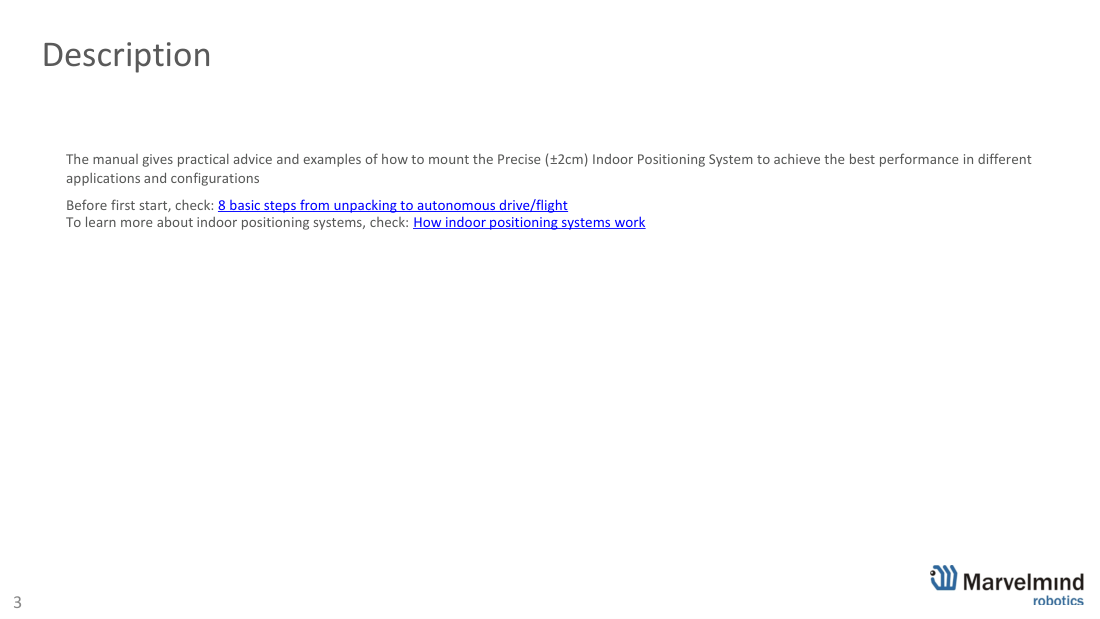
Contents
The manual is organized as a set of placement cases. Use the menu on the left to jump to any case instantly. Quick map:
- 01a · Simple 2D (robot / RC car)
- 01b · Paired beacons 2D (direction)
- 02a · Simple 3D (drone)
- 02b · Simple 3D for DJI drones
- 02c · Paired beacons 3D
- 02d · Microphone RX1 pattern
- 03 · Sidewalks, tunnels, metros, mines (2D)
- 04 · Submaps in 2D (multi-room)
- 05 · Wheeled robot, 46×5 m
- 06 · Business center – people tracking
- 07 · 100×100 m warehouse with submaps
- 08 · Fully overlapping submaps (IA)
- 09 · Rooms + corridor (IA)
- 10 · Rooms with columns + corridor
- 11 · Tunnel 1200×25 m inspection
- 12 · Reducing tracking delay (latency)
- 13 · Stable Z for drones
- 14a · Multi-modem 1.5D
- 14b · Split-Modem (fast objects)
- 15 · 30×30 m step-by-step
- 16 · Legacy Starter Set HW v4.9
- 17 · Contacts and support
01a · Simple 2D tracking
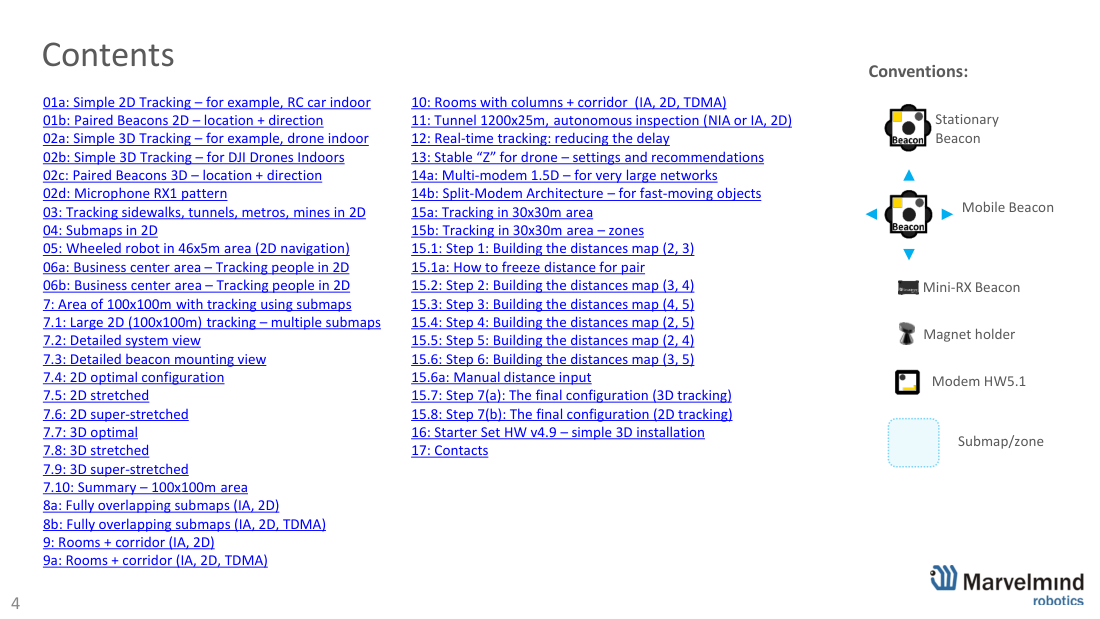
Simple 2D tracking (X, Y) – the easiest starting setup for one wheeled robot, RC car or one person in a room. Not for drones (they need 3D). Start with a 6×4 to 6-10 m map; a single Starter Set Super-MP-3D covers up to ~1000 m².
Configuration: 2× stationary Super-Beacon on different ultrasonic frequencies (of 8: 19/22/25/28/31/34/37/45 kHz), 1× mobile Super-Beacon on the robot, 1× Modem HW v5.1, 2× magnet holders.
Mounting: place each stationary beacon on a magnet holder rotated ~45° from the wall to minimize ultrasonic shadows; enable only the required sensors (each ~90° beam) for higher sensitivity and noise immunity. The Modem must stay powered while tracking and can sit tens-hundreds of metres away depending on antenna/RSSI. Architecture: NIA (good to get familiar, 1 mobile beacon) or IA (for 2-4+ mobile beacons).
01b · Paired beacons 2D
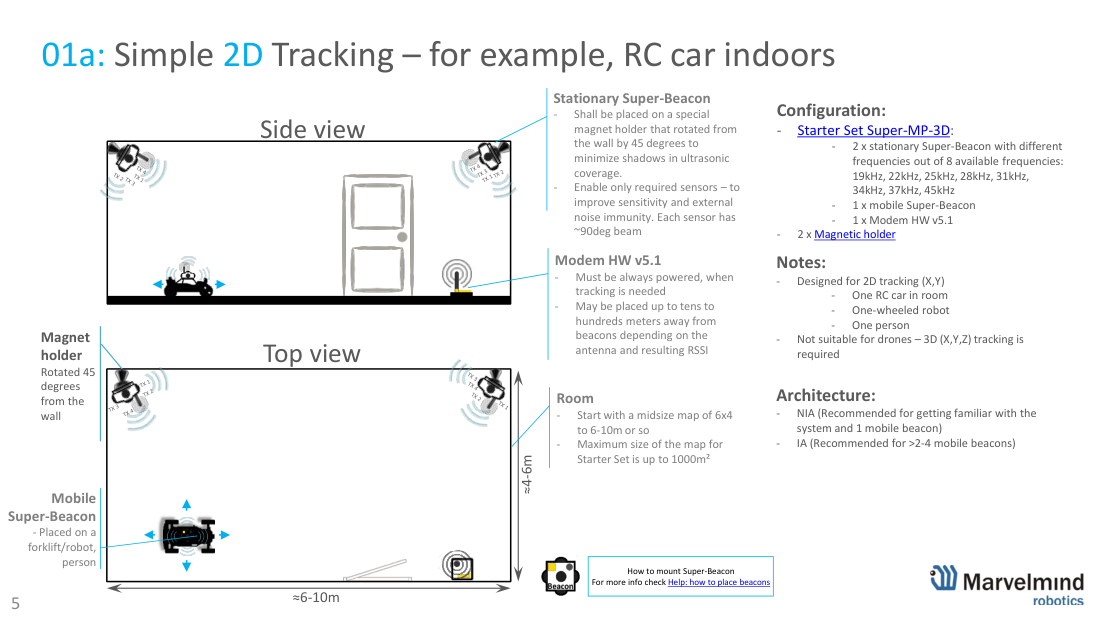
Paired beacons in 2D – location + direction. When you need not only position (like GPS) but also heading/orientation, mount two mobile Super-Beacons on the robot/vehicle. This avoids an indoor compass (unreliable near metal). The larger the base between the two beacons, the better the directional precision – use ≥20 cm, ideally ≥0.5 m.
Configuration: 2× stationary Super-Beacon (different frequencies) + 2× mobile Super-Beacon + 1× Modem HW v5.1 + 2× magnet holders. To learn more about orientation see Help: IMU.
02a · Simple 3D tracking
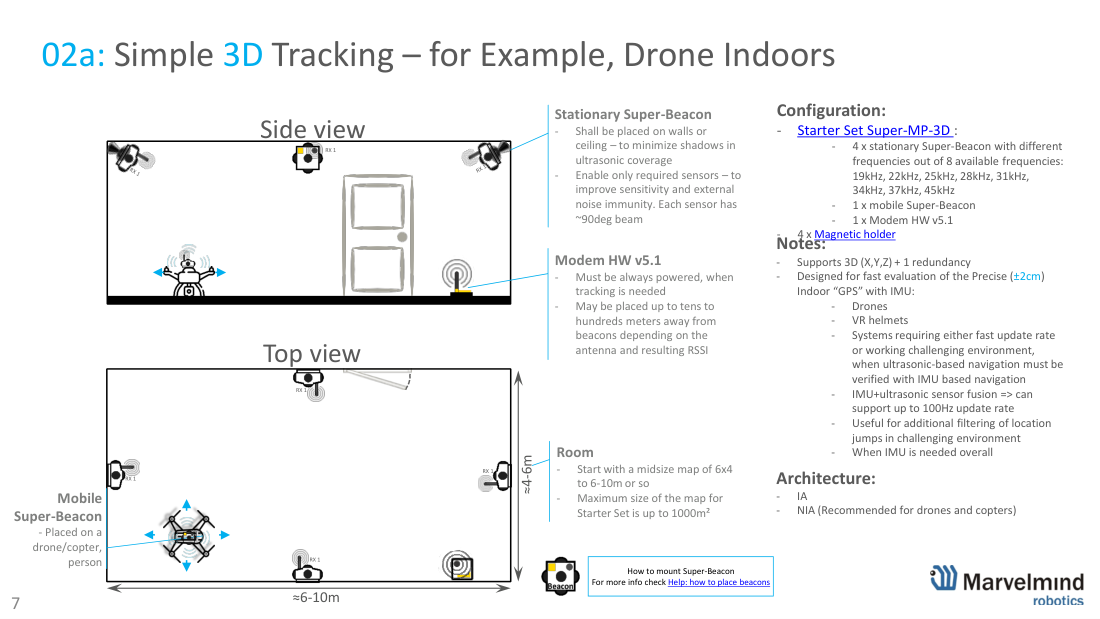
Simple 3D tracking (X, Y, Z + 1 redundancy) – the starting setup for a drone, copter or VR helmet indoors. Four stationary beacons on the walls/ceiling give full 3D with one spare, so if one beacon is blocked, 3D tracking continues.
Configuration: 4× stationary Super-Beacon (different frequencies), 1× mobile Super-Beacon on the drone, 1× Modem HW v5.1, 4× magnet holders.
Designed for fast evaluation of the precise (±2 cm) indoor “GPS” with IMU. With IMU + ultrasonic sensor fusion the system reaches up to 100 Hz update rate and filters out location jumps in challenging environments. Architecture: IA, or NIA (recommended for drones/copters).
02b · Simple 3D for DJI drones
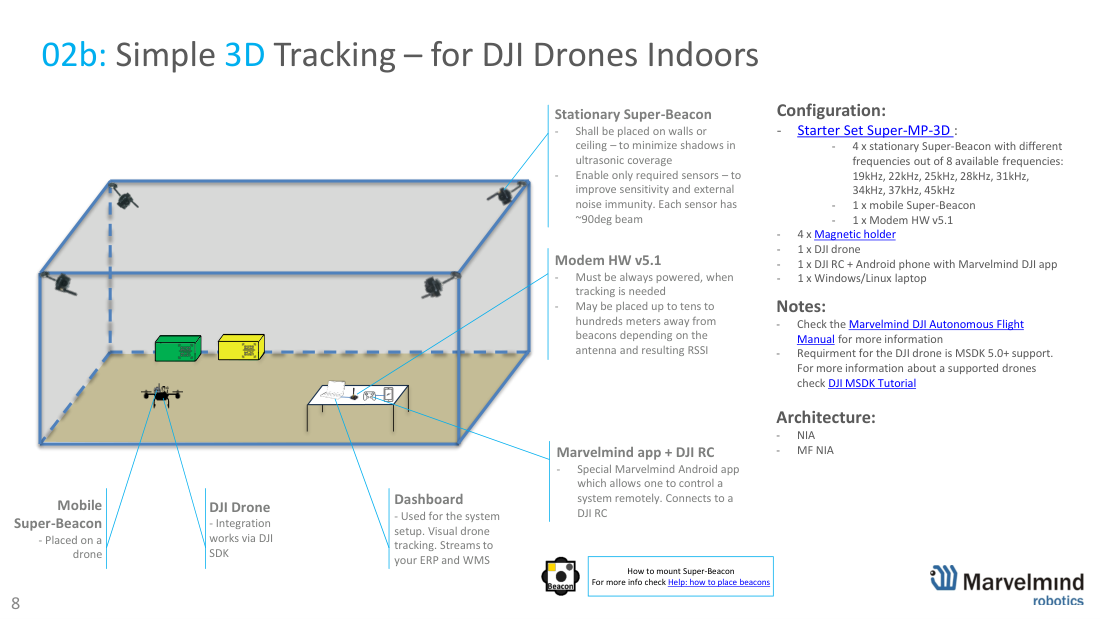
Simple 3D tracking for DJI drones indoors. Fly DJI drones autonomously indoors with ±2 cm positioning. Integration runs through the DJI SDK; the drone must support MSDK 5.0+. See the Marvelmind DJI autonomous flight pages and the DJI Autonomous Flight Manual.
Configuration: 4× stationary Super-Beacon + 1× mobile Super-Beacon on the drone + 1× Modem HW v5.1 + 4× magnet holders + 1× DJI drone + DJI RC with an Android phone running the Marvelmind DJI app + a Windows/Linux laptop running the Dashboard. Architecture: NIA or MF NIA.
02c · Paired beacons 3D
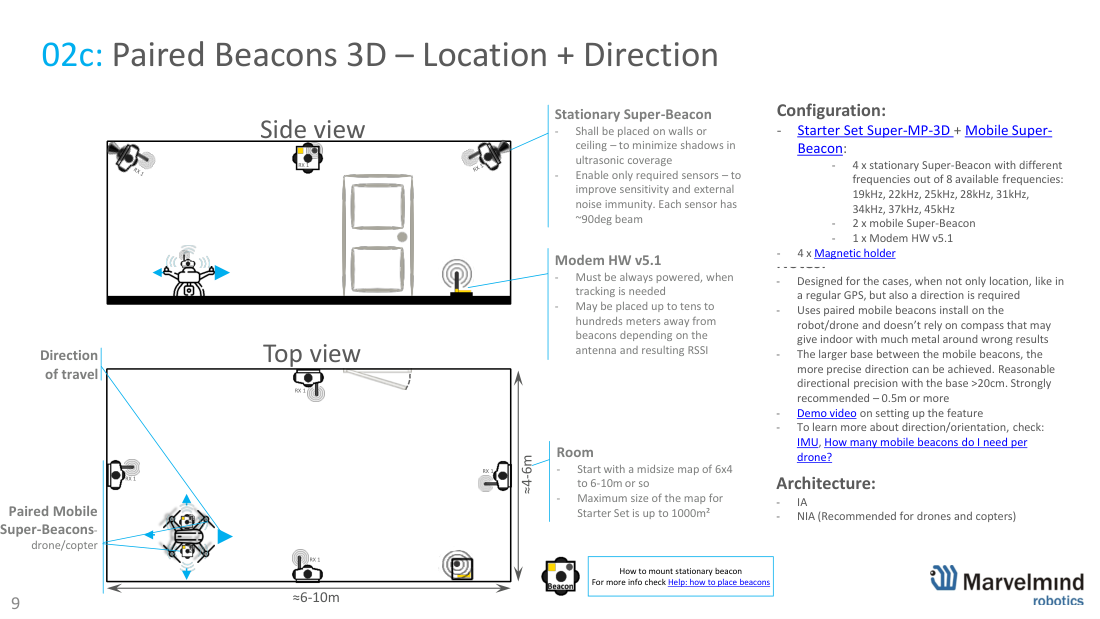
Paired beacons in 3D – location + direction for drones/copters that need heading as well as position. Two mobile Super-Beacons on the aircraft (base ≥0.5 m recommended) give orientation without a magnetometer. Configuration: 4× stationary Super-Beacon + 2× mobile Super-Beacon + 1× Modem HW v5.1 + 4× magnet holders. See Help: how many mobile beacons per drone.
02d · Microphone RX1 pattern
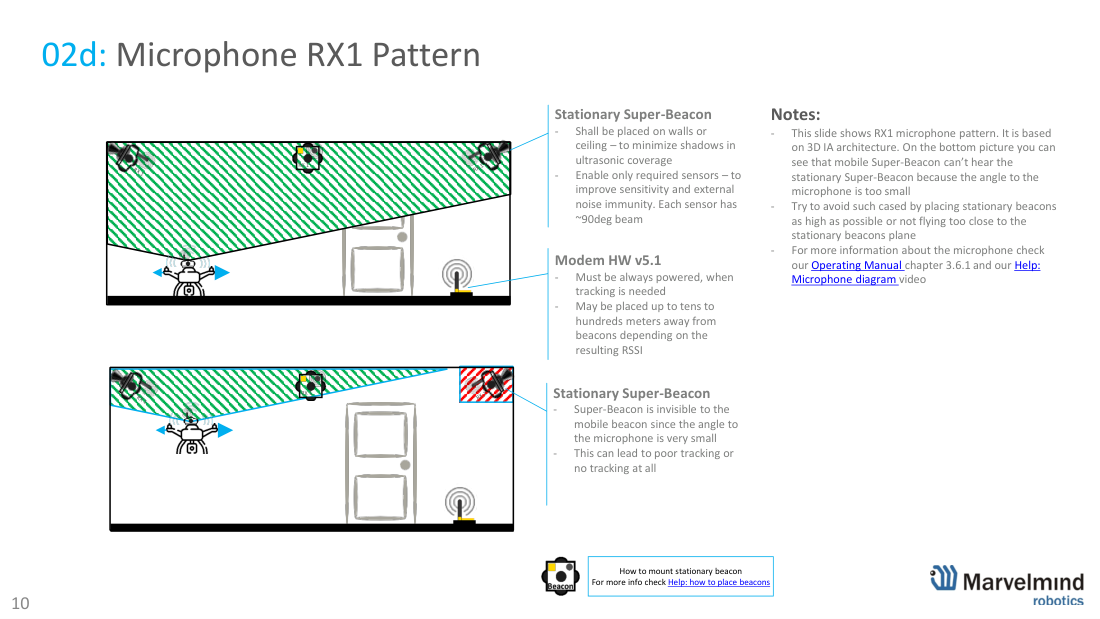
Microphone (RX1) directivity pattern. Each ultrasonic sensor has roughly a 90° beam. If the angle from a mobile beacon to a stationary beacon’s microphone is too small, the beacon becomes “invisible” and tracking degrades or stops. Avoid this by mounting stationary beacons as high as possible and by not flying too close to the plane of the stationary beacons. See the Operating Manual ch. 3.6.1 and Help: microphone diagram video.
03 · Sidewalks, tunnels, metros, mines (2D)
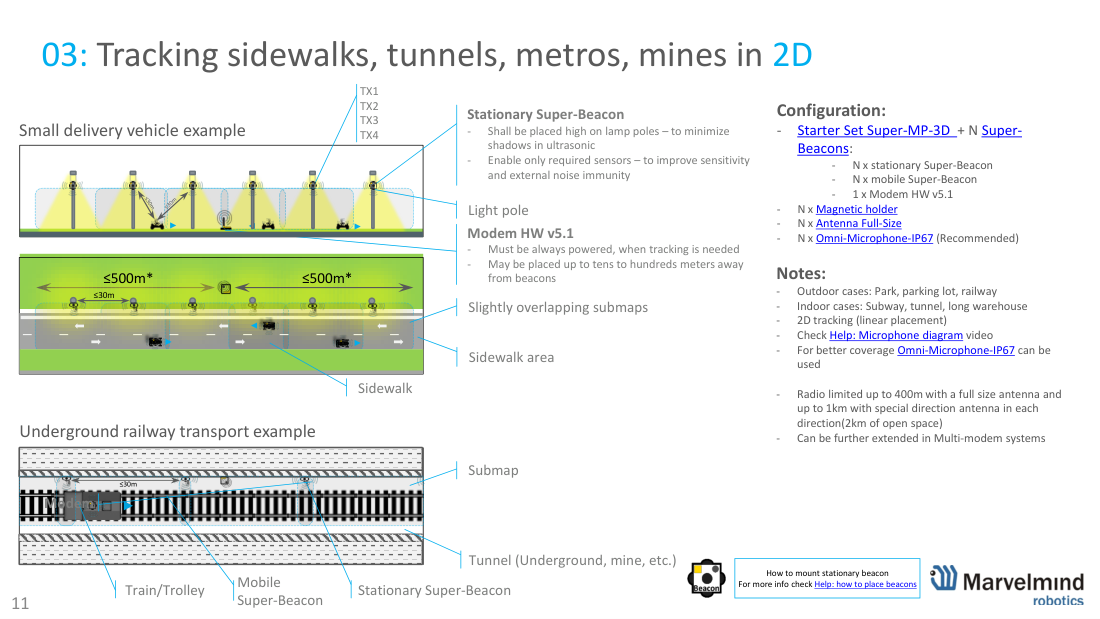
Linear 2D tracking for long, narrow spaces – sidewalks, parking, railway, subways, tunnels, long warehouses and mines. Stationary Super-Beacons are placed in a line (e.g. on lamp poles) with slightly overlapping submaps. Radio reaches up to ~400 m with a full-size / directional antenna (up to ~1 km per direction in open space) and can be extended further with multi-modem systems.
Configuration: N× stationary + N× mobile Super-Beacon, 1× Modem HW v5.1, N× magnet holders, N× full-size antennas, and N× Omni-Microphone-IP67 (recommended for wide coverage).
04 · Submaps in 2D (multi-room)
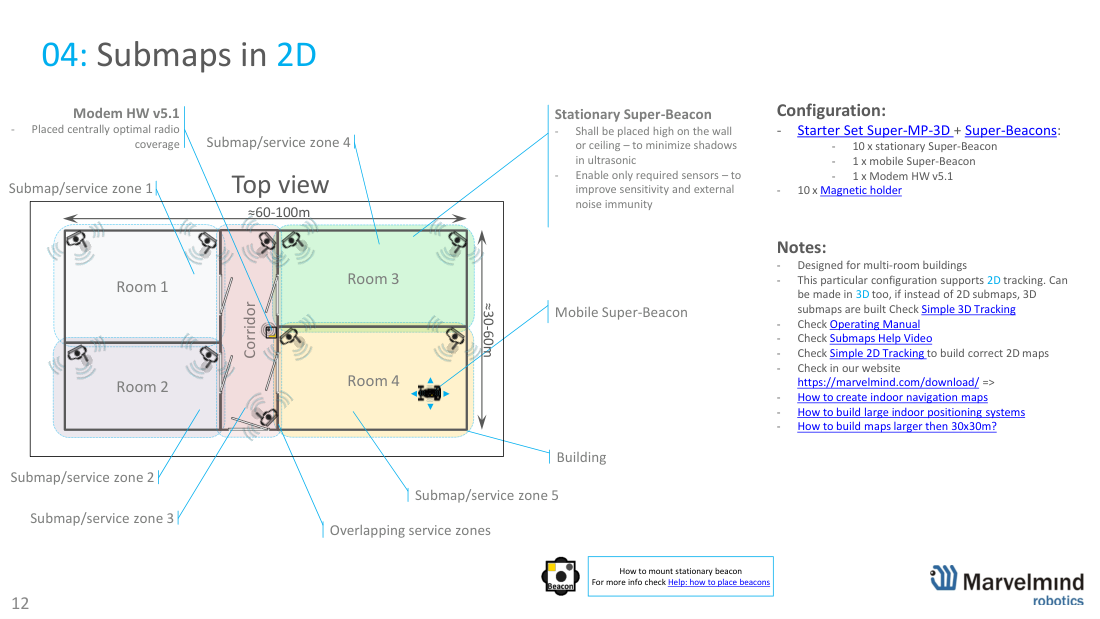
Submaps in 2D for multi-room buildings (≈30-100 m). Each room/zone is a submap with overlapping service zones for smooth handover as the mobile beacon moves between rooms. Can also be built in 3D using 3D submaps.
Configuration: 10× stationary Super-Beacon + 1× mobile Super-Beacon + 1× Modem HW v5.1 (placed centrally for radio coverage) + 10× magnet holders. See the Operating Manual, Submaps Help video, and articles on building large maps.
05 · Wheeled robot, 46×5 m
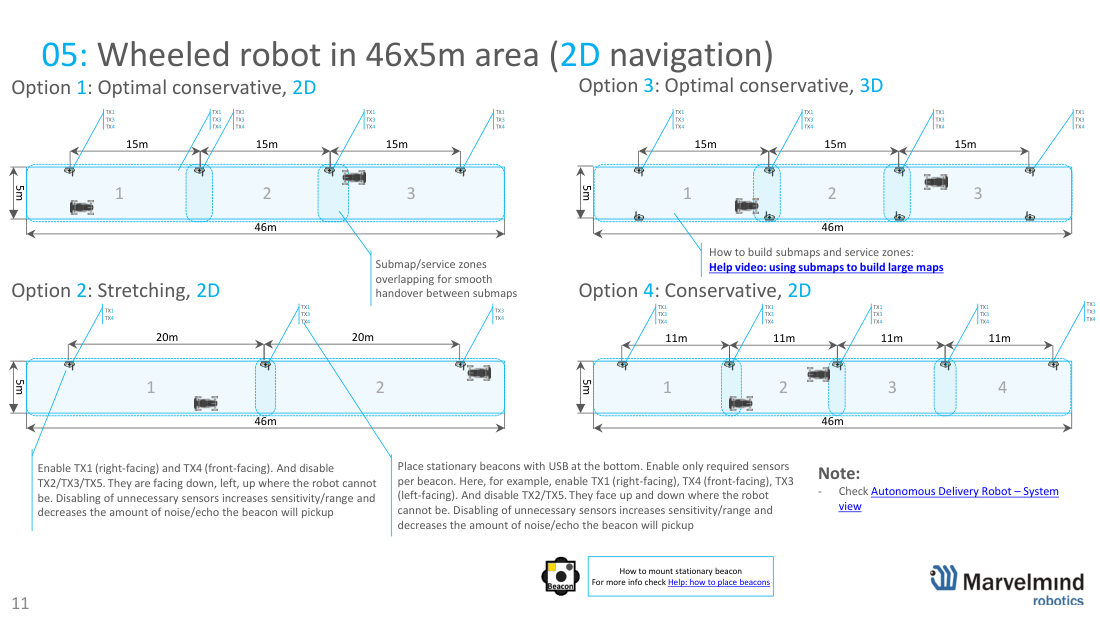
Wheeled robot / autonomous delivery robot in a 46×5 m corridor (2D navigation). Long, narrow area covered by a chain of overlapping submaps for seamless handover. Mount stationary beacons with the USB at the bottom and enable only the facing sensors (e.g. TX1 right, TX4 front, TX3 left; disable TX2/TX5 that point up/down): disabling unused sensors raises sensitivity/range and cuts noise/echo.
06 · Business center – people tracking
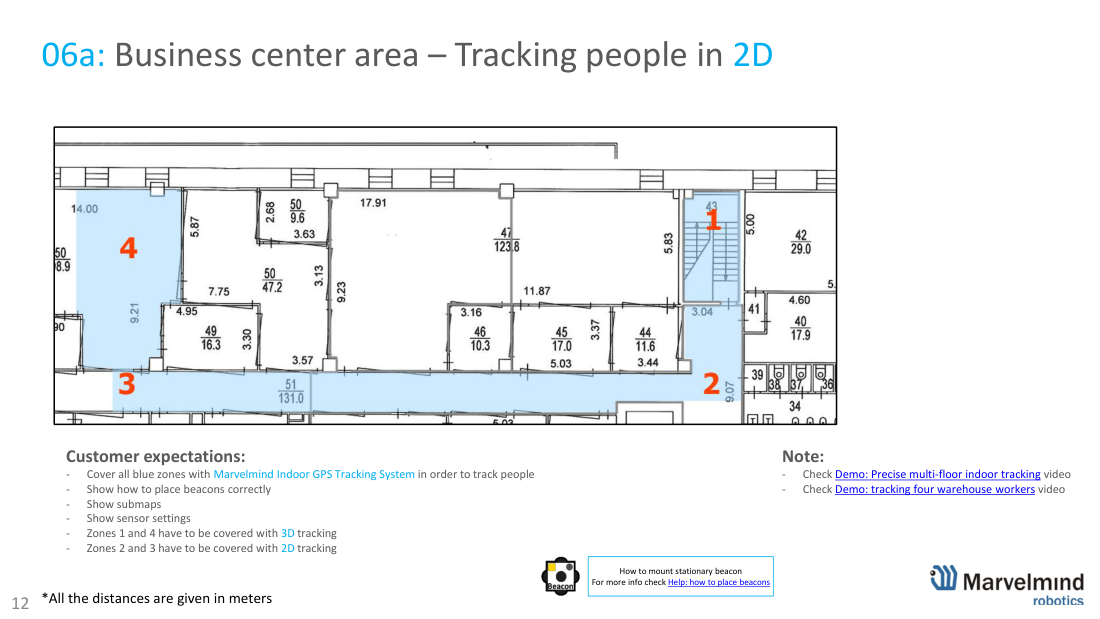
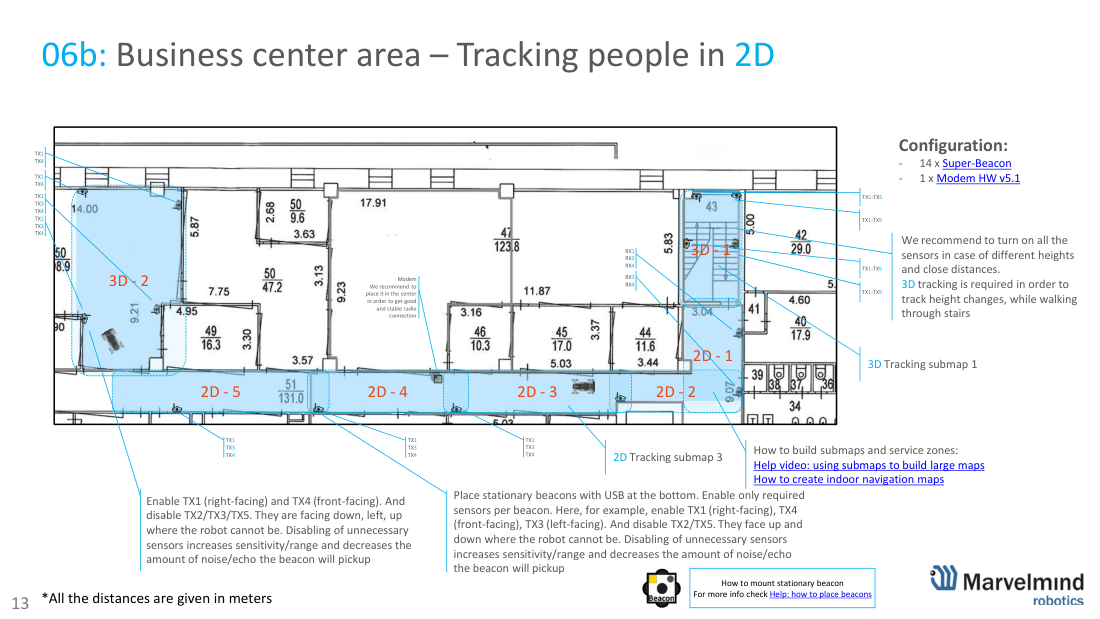
Tracking people across a business center / multi-floor building (2D, with 3D where needed). Cover all required zones, place beacons correctly, define submaps and per-beacon sensor settings. Mix 2D and 3D submaps – e.g. 3D where height changes on stairs. Example uses 14× Super-Beacon + 1× Modem HW v5.1, modem placed centrally for stable radio. See Demo: precise multi-floor indoor tracking and tracking warehouse workers.
07 · 100×100 m warehouse with submaps
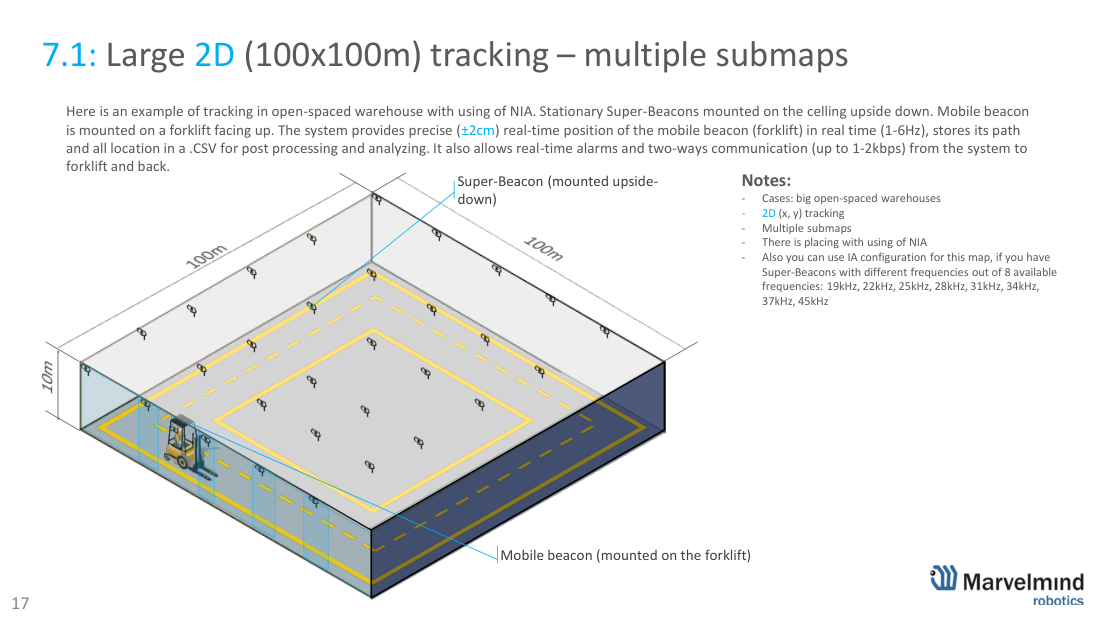
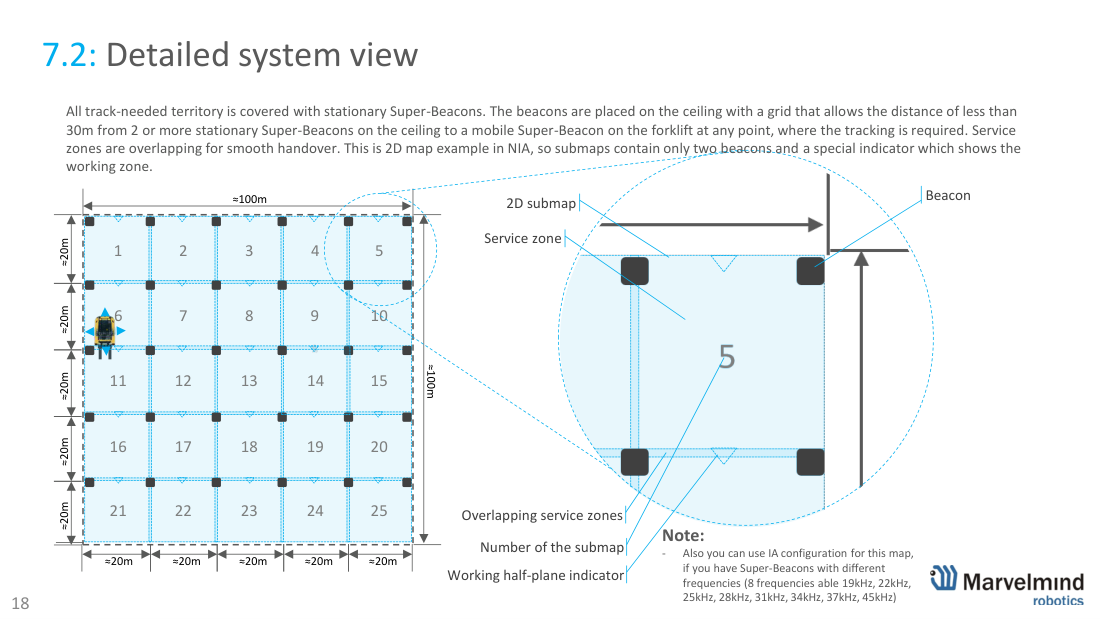
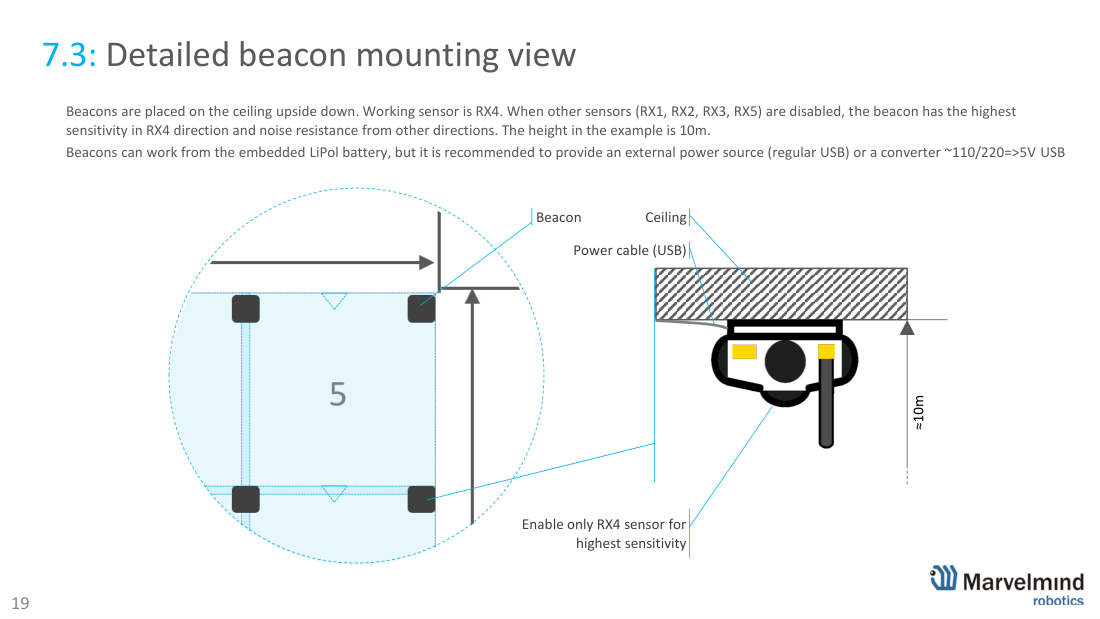
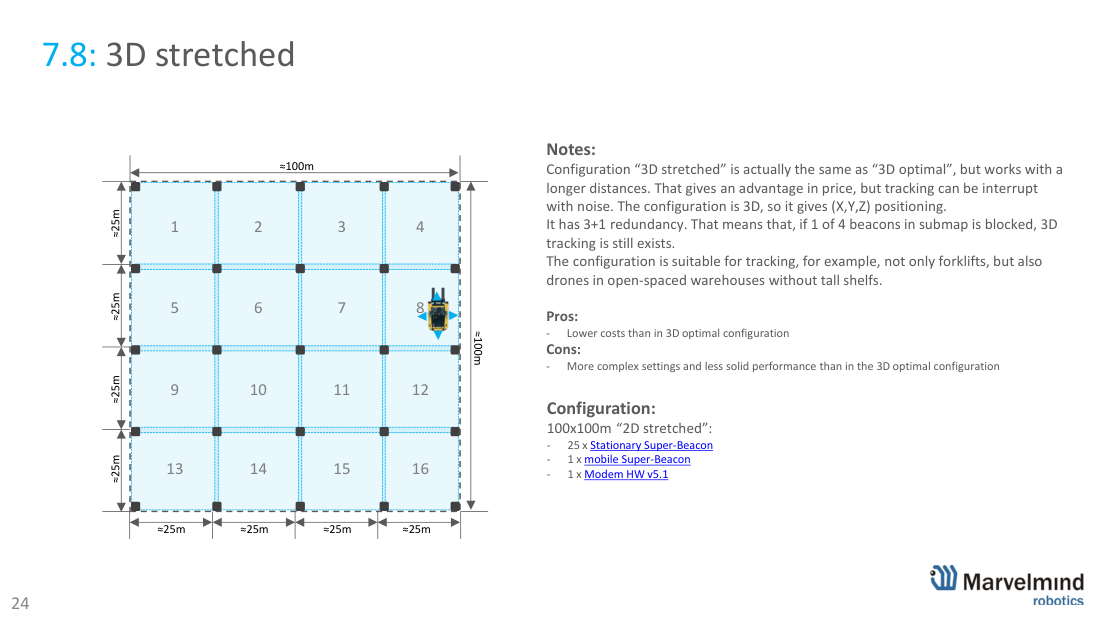
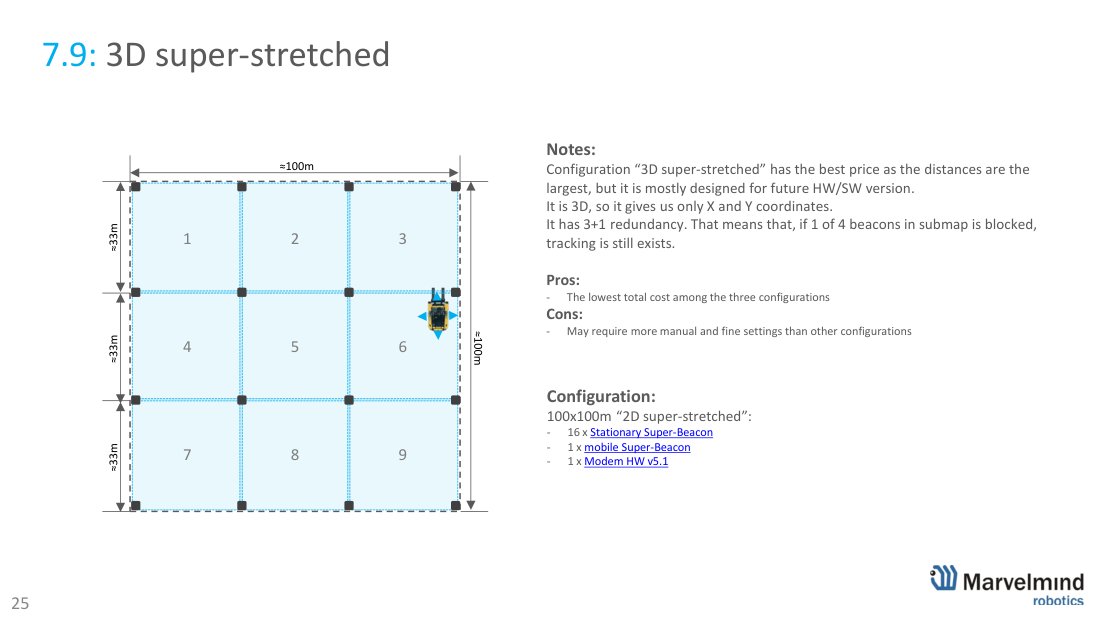
Large open-space warehouse, 100×100 m, with the submap feature (NIA). Stationary Super-Beacons are mounted on the ceiling facing down; the mobile beacon on a forklift faces up. The system gives precise (±2 cm) real-time position (1-6 Hz), logs the full path to CSV, and supports real-time alarms and two-way communication. Service zones overlap for smooth handover. Below: six placement options trading beacon count (cost) against robustness – pick by your budget and reliability needs.
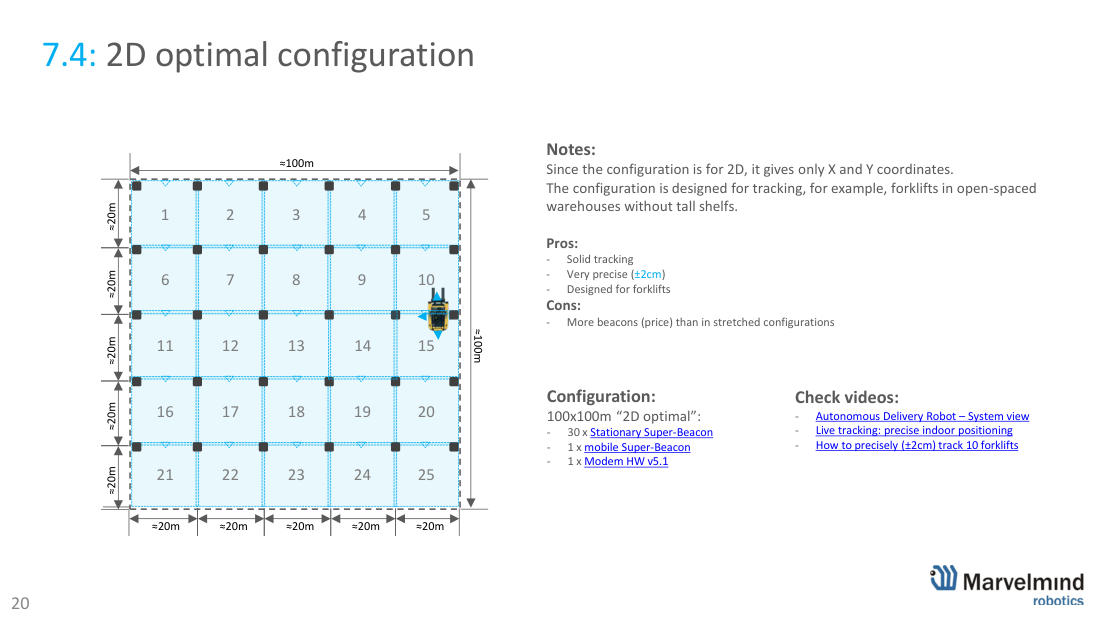
7.4 · 2D optimal – 30 beacons
Solid, very precise (±2 cm) 2D tracking for forklifts in open warehouses without tall shelves. Pro: robust. Con: more beacons (cost). 30× stationary Super-Beacon + 1× mobile + 1× Modem HW v5.1.
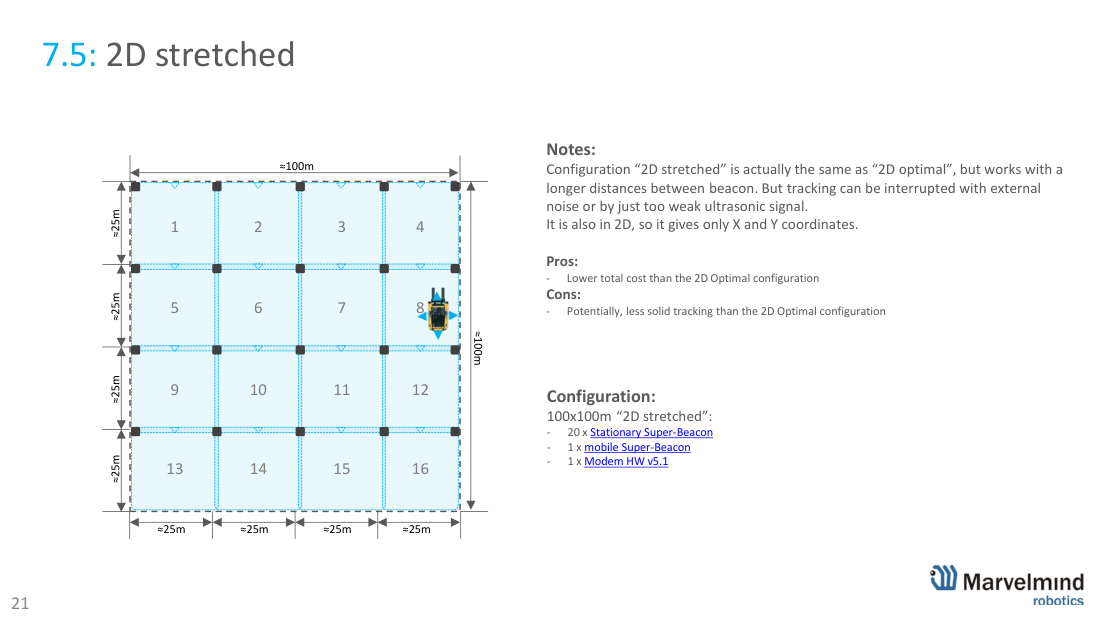
7.5 · 2D stretched – 20 beacons
Same idea, longer spacing – lower cost, slightly less solid (more sensitive to noise/weak signal). 20× stationary.
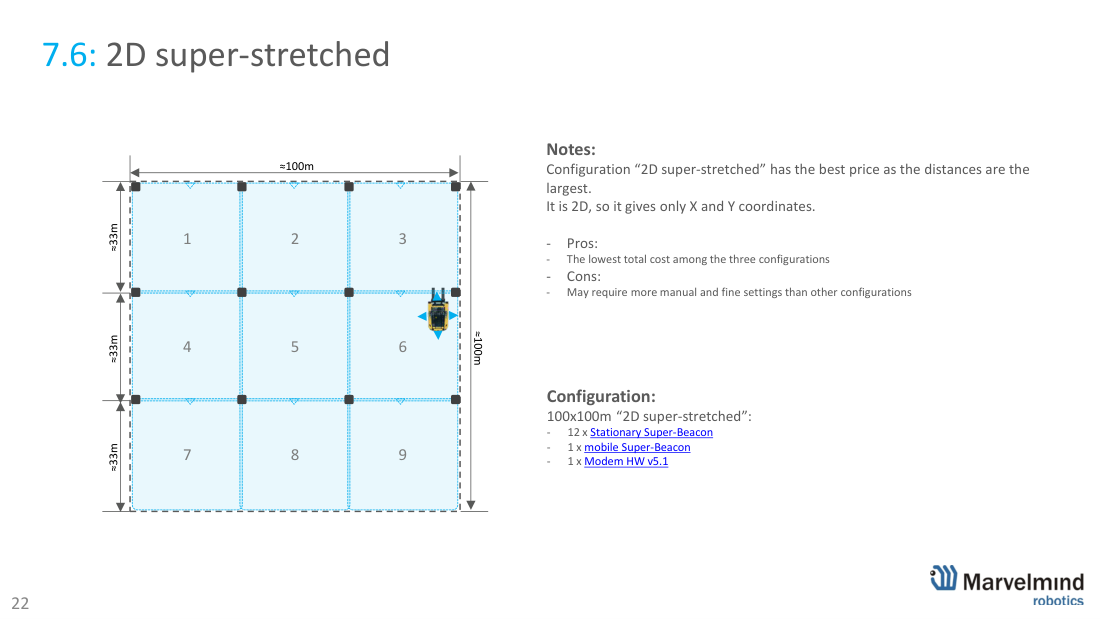
7.6 · 2D super-stretched – 12 beacons
Lowest cost (largest spacing); may need more manual fine-tuning. 12× stationary.
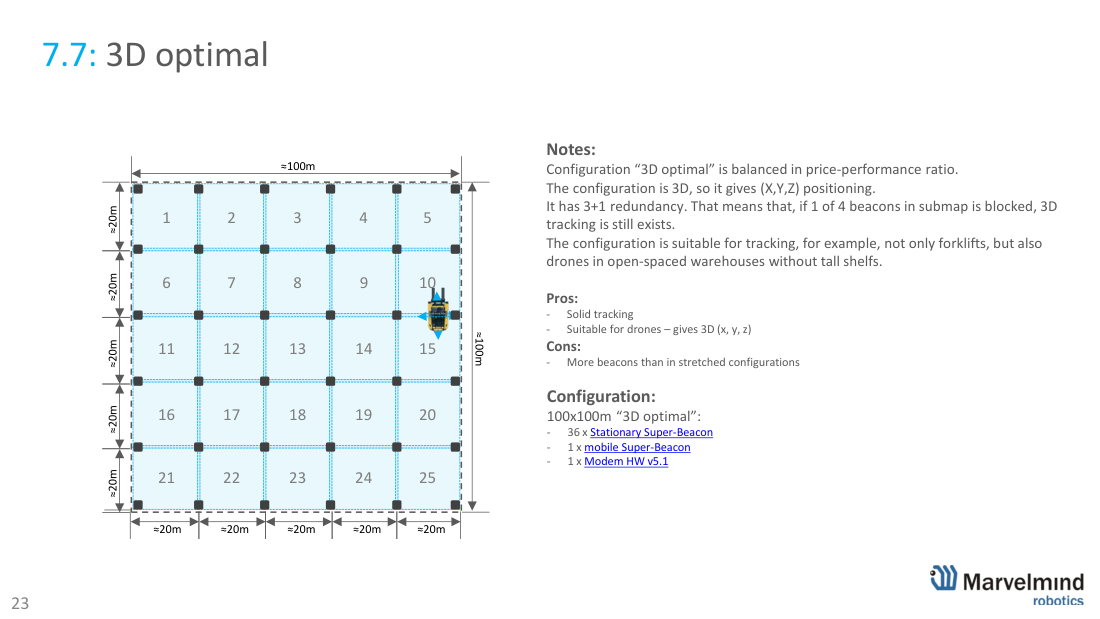
7.7 · 3D optimal – 36 beacons
Balanced price/performance 3D (X,Y,Z) with 3+1 redundancy – suits forklifts and drones. 36× stationary.
7.8 · 3D stretched – 25 beacons
Lower cost than 3D optimal, more complex settings. 25× stationary, 3+1 redundancy.
7.9 · 3D super-stretched – 16 beacons
Lowest-cost 3D (largest spacing), mostly for future HW/SW; 3+1 redundancy. 16× stationary.
See videos: autonomous delivery robot system view, live precise indoor positioning, and how to precisely track 10 forklifts.
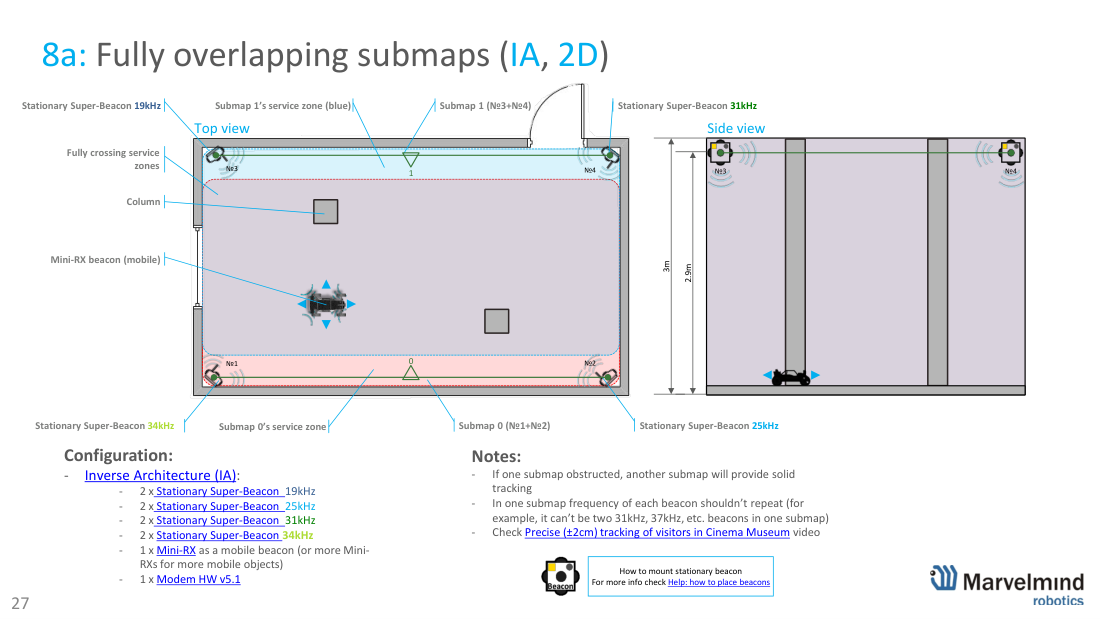
08 · Fully overlapping submaps (IA, 2D)
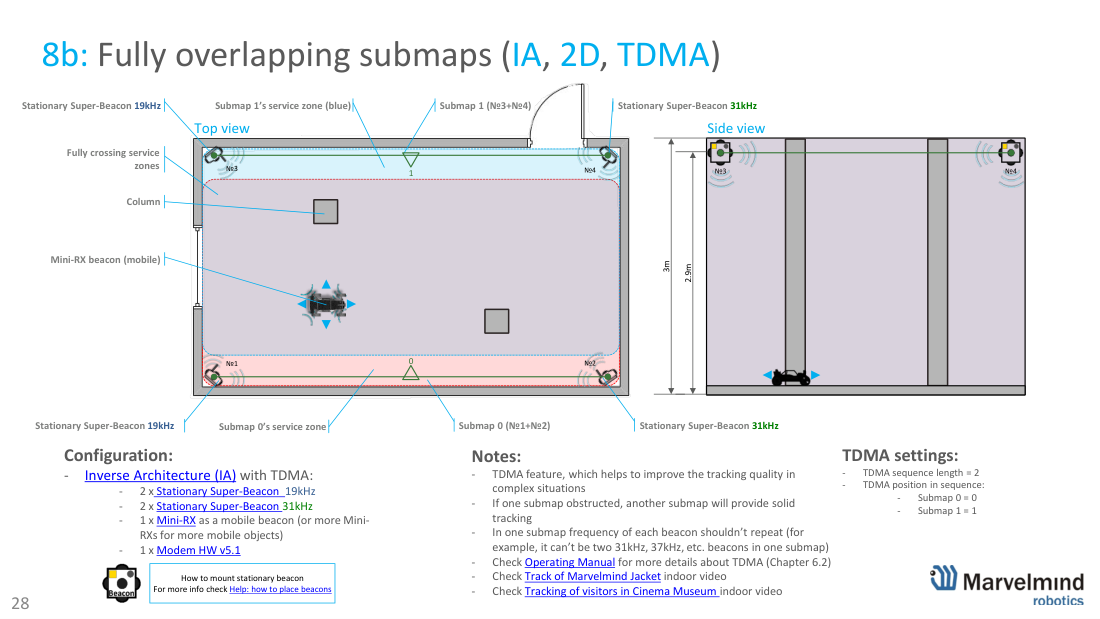
Fully overlapping submaps in Inverse Architecture (IA). Two submaps fully cross, so if one is obstructed (e.g. by a column) the other keeps solid tracking. Within one submap, no two beacons may share a frequency. 8a uses 8× stationary Super-Beacon (19/25/31/34 kHz pairs) + 1× Mini-RX mobile + 1× Modem HW v5.1. 8b adds TDMA (sequence length 2) for better quality in complex situations – see Operating Manual ch. 6.2.
09 · Rooms + corridor (IA)
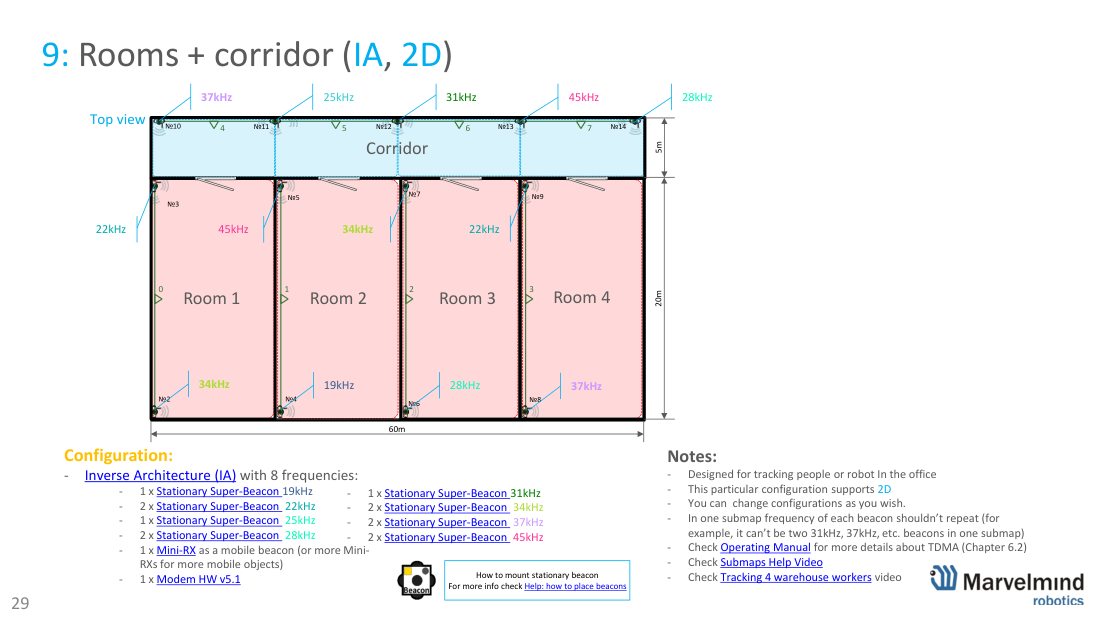
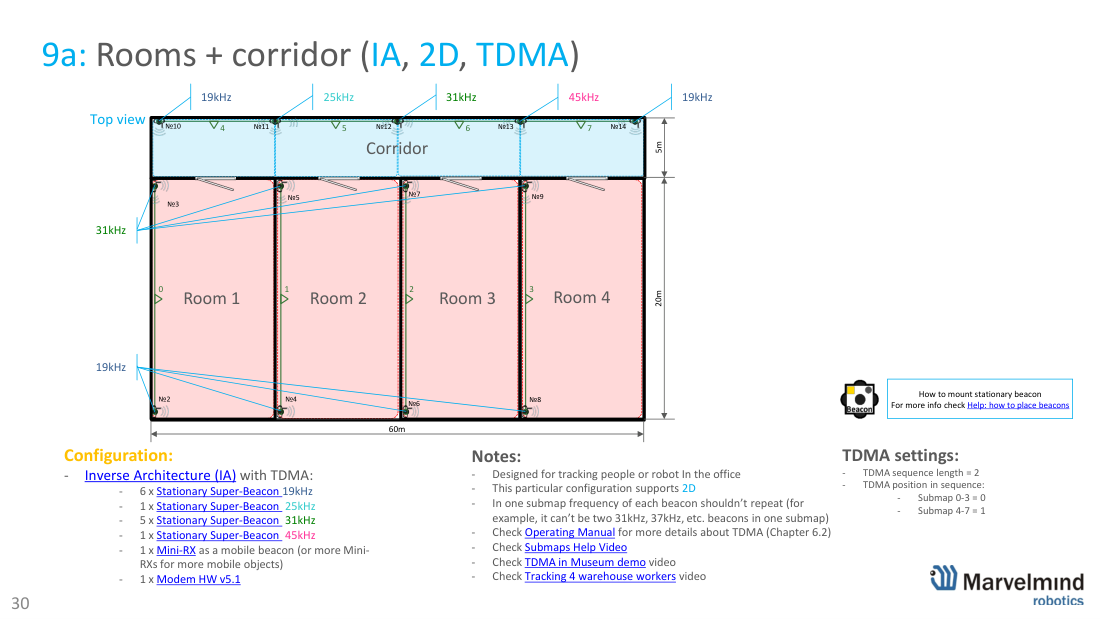
Rooms + corridor (IA, 2D) for tracking people or a robot in an office (≈60×20 m). Each room/corridor is covered by IA submaps using 8 frequencies; no repeated frequency inside a submap. 9a adds TDMA. Example: many stationary Super-Beacons across the 8 frequencies + 1× Mini-RX mobile + 1× Modem HW v5.1.
10 · Rooms with columns + corridor
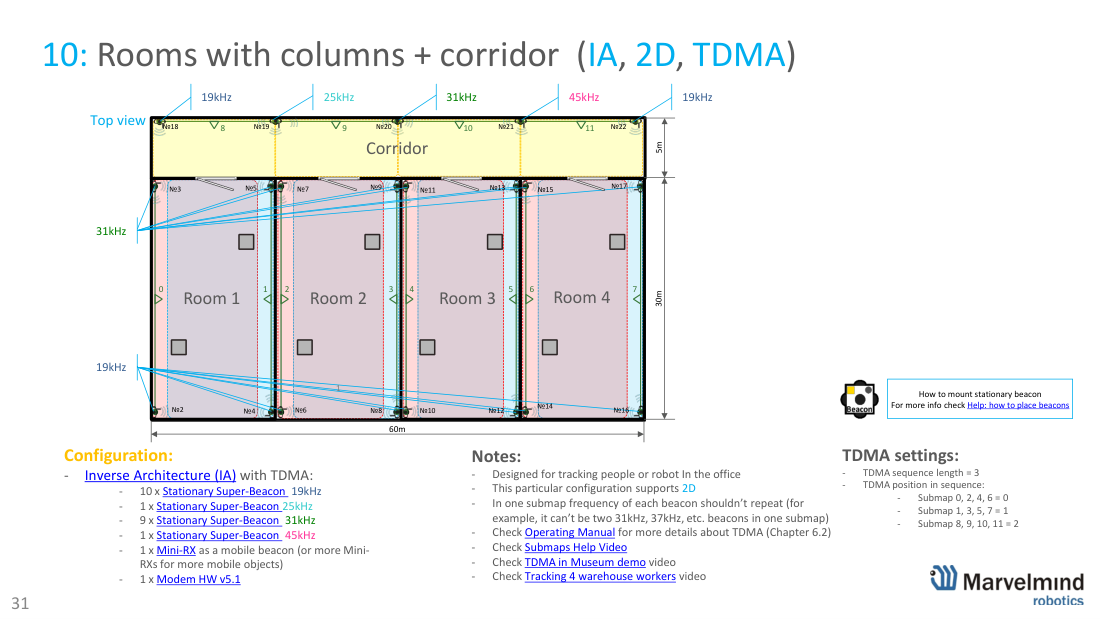
Rooms with columns + corridor (IA, 2D, TDMA). Columns create obstructions, so denser overlapping submaps and a TDMA sequence length of 3 keep tracking solid. ≈60×30 m office example with ~22 stationary Super-Beacons + 1× Mini-RX mobile + 1× Modem HW v5.1.
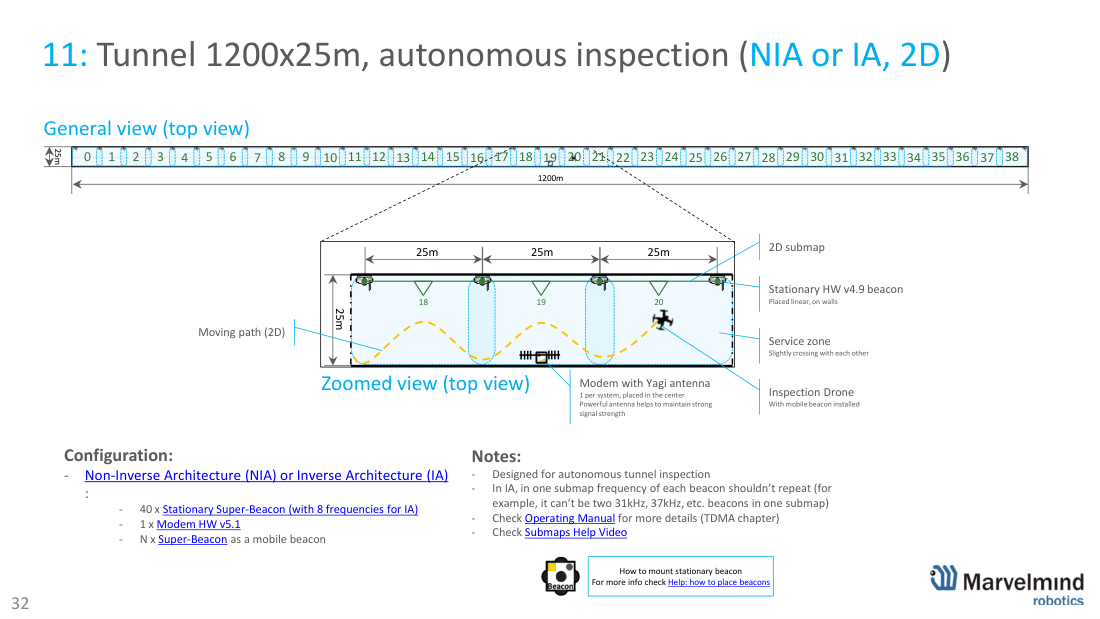
11 · Tunnel 1200×25 m inspection
Autonomous tunnel inspection, 1200×25 m (NIA or IA, 2D). Stationary beacons are placed linearly along the walls with slightly crossing service zones; an inspection drone carries the mobile beacon. A Modem with a Yagi antenna sits centrally for strong signal. ~40× stationary Super-Beacon + 1× Modem HW v5.1 + N× mobile.
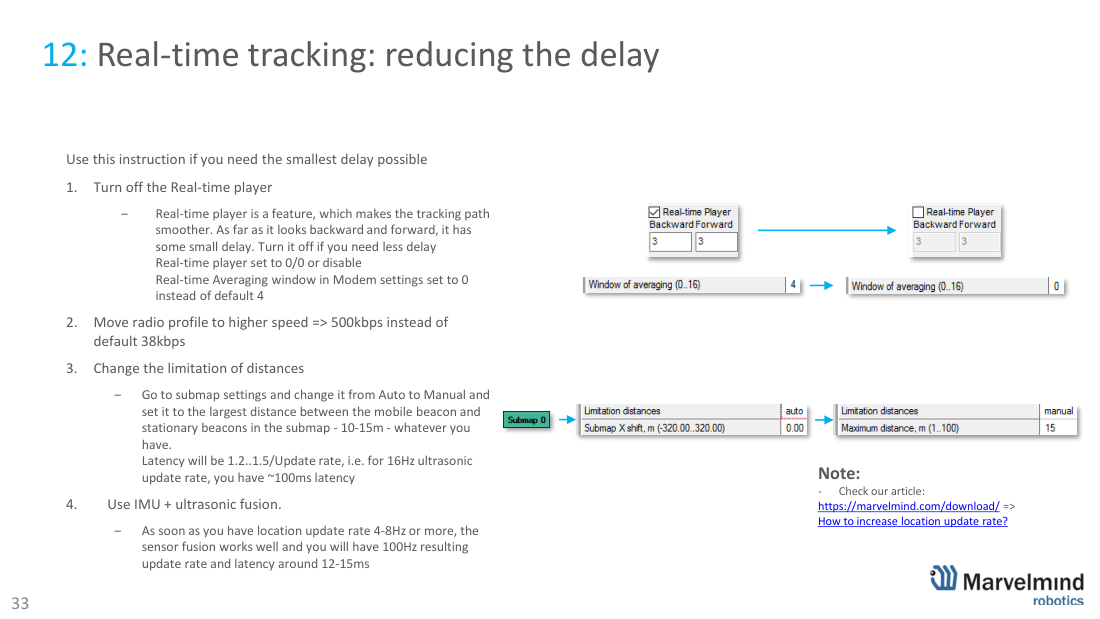
12 · Reducing tracking delay (latency)
Reducing latency when you need the smallest delay: (1) turn off the Real-time Player (set 0/0; averaging window 0); (2) move the radio profile to 500 kbps (from 38 kbps); (3) set submap distance limit to Manual at the largest beacon distance (latency ≈ 1.2-1.5 / update rate, e.g. ~100 ms at 16 Hz); (4) use IMU + ultrasonic fusion – at ≥4-8 Hz updates you get ~100 Hz output and ~12-15 ms latency. See How to increase location update rate?
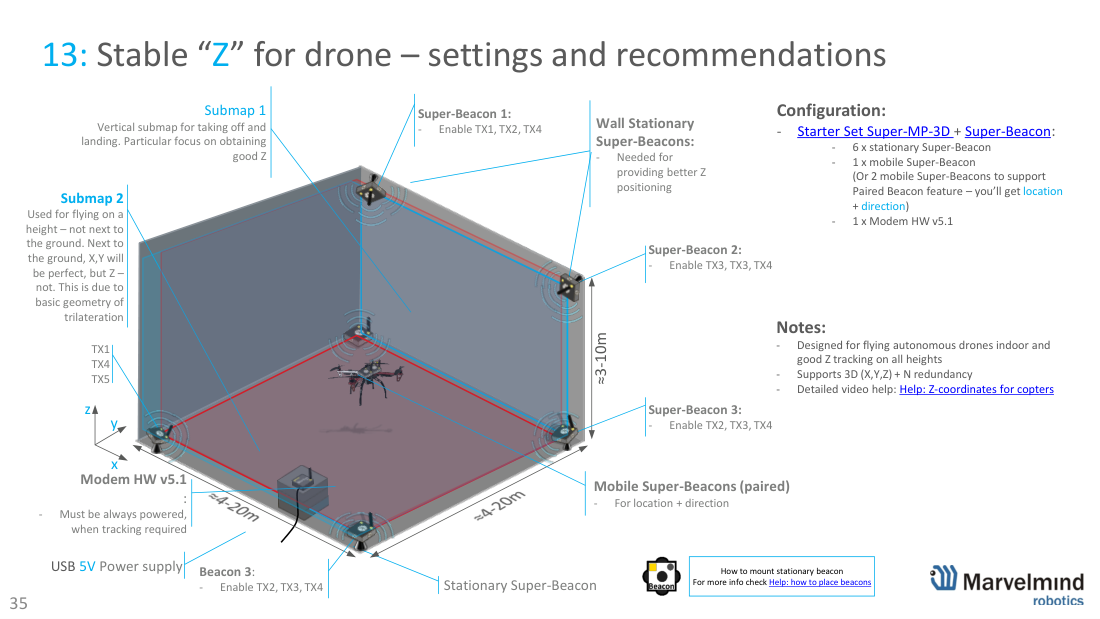
13 · Stable Z for drones
Stable “Z” (height) for autonomous drones indoors. Good Z at all heights needs wall stationary Super-Beacons plus a dedicated vertical submap for take-off/landing (focus on Z), and a second submap for flight at height. Near the ground X,Y are perfect but Z is weaker due to trilateration geometry – the vertical submap fixes this. Example: 6× stationary + 1-2× mobile Super-Beacon (2 for paired location+direction) + 1× Modem HW v5.1. See Help: Z-coordinates for copters.
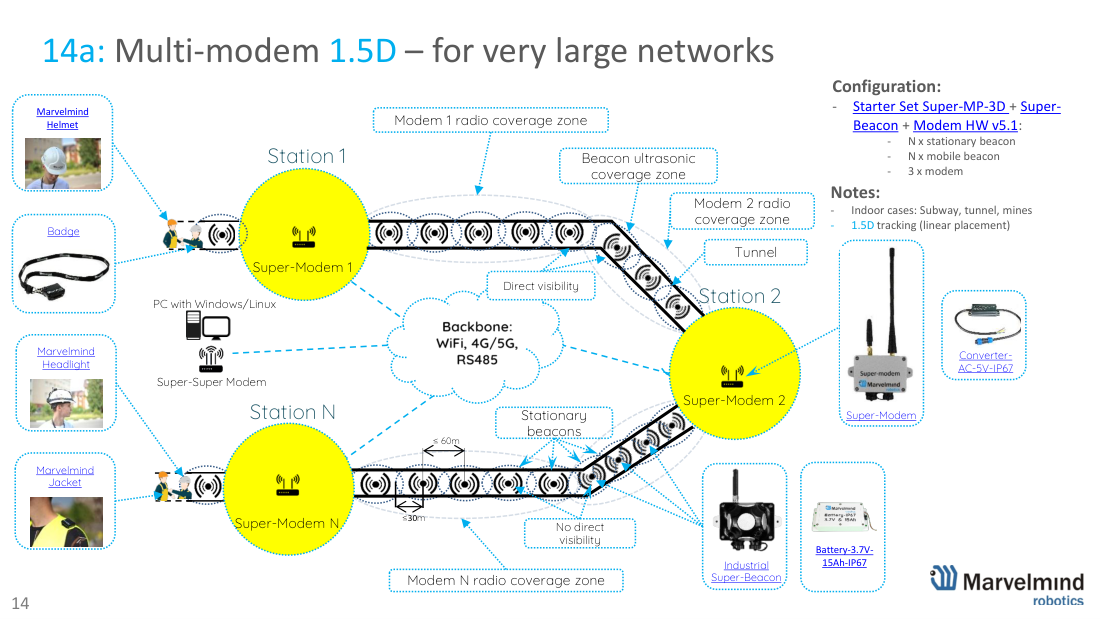
14a · Multi-modem 1.5D
Multi-modem 1.5D for very large linear networks – subways, tunnels, mines. Multiple Super-Modems chain together (Super-Modem → Super-Super-Modem → PC), each covering ≤60 m, so the network extends far beyond a single modem’s radio range. Works with Industrial Super-Beacons, Badge and IA wearables, and accessories (batteries, converters) for permanent installs.
14b · Split-Modem (fast objects)
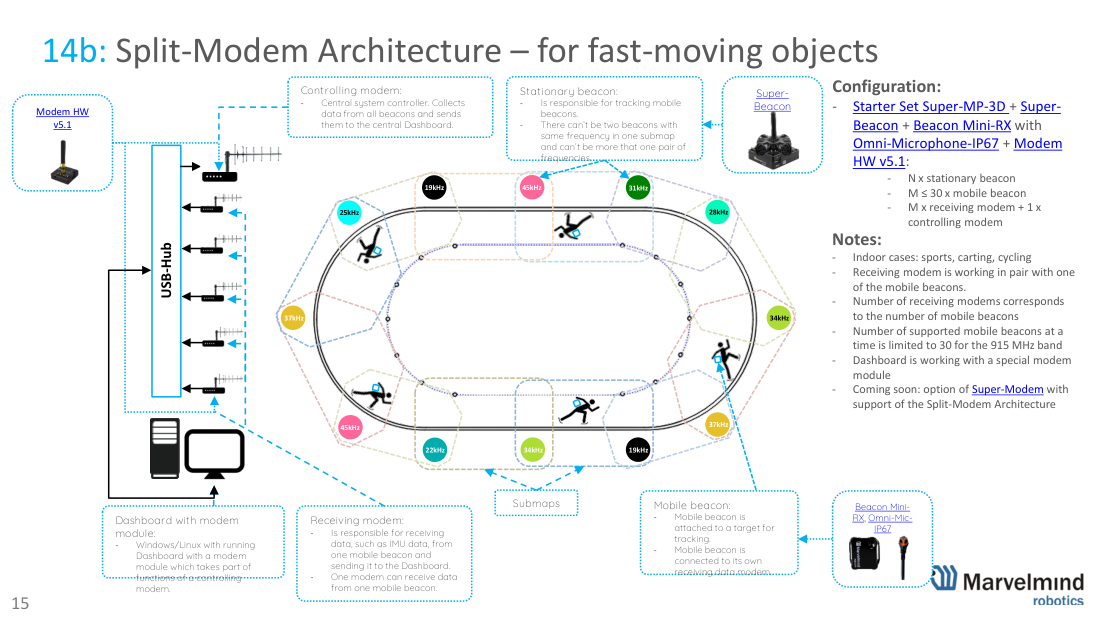
Split-Modem Architecture for fast-moving objects (sports, karting, cycling). A controlling modem collects data and talks to the Dashboard; each mobile beacon gets its own receiving Modem for low-latency IMU data. Up to 30 mobile beacons on the 915 MHz band. Uses Super-Beacons and Mini-RX with Omni-Microphone-IP67.
15 · 30×30 m area, step-by-step
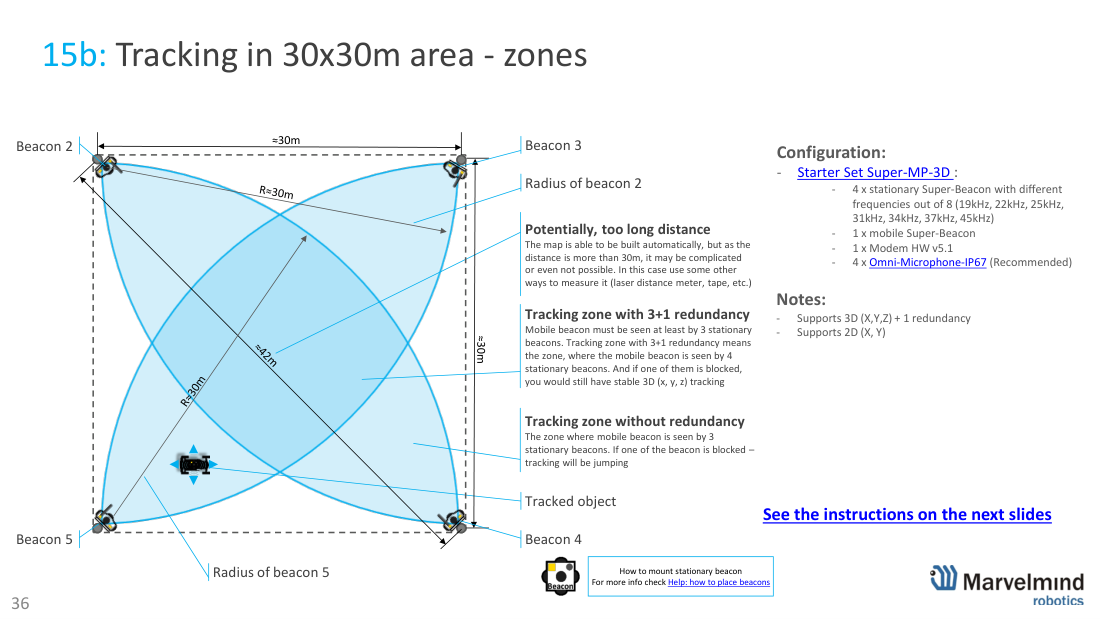
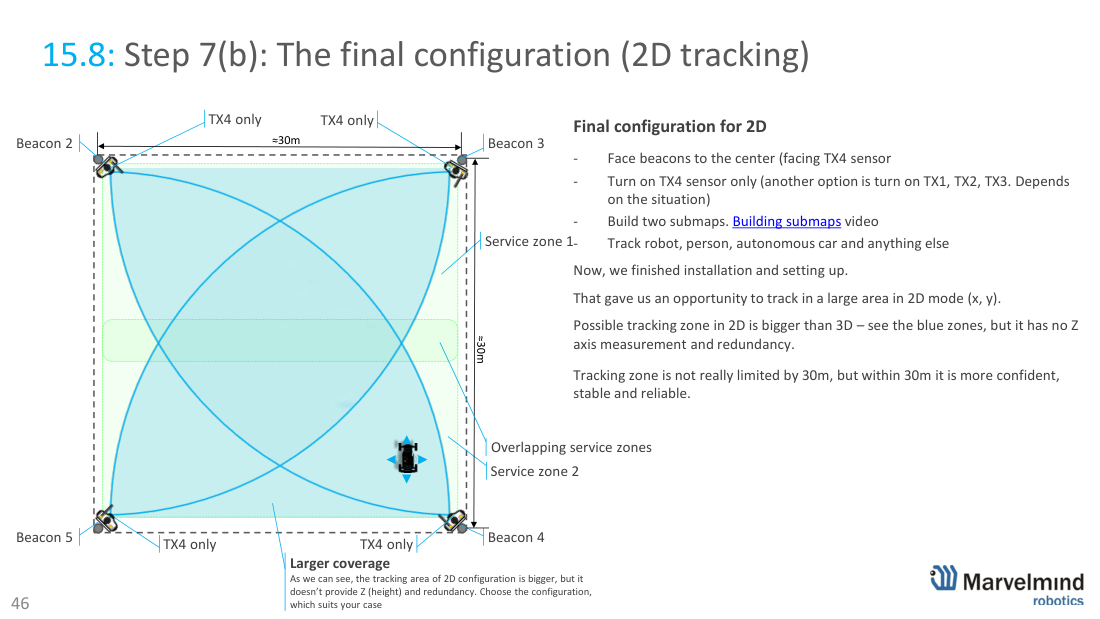
Covering a 30×30 m open area – full step-by-step. Available as 2D (X,Y) or 3D (X,Y,Z) with 3+1 redundancy: the mobile beacon must be seen by ≥3 stationary beacons (4 for redundancy, so tracking survives one blocked beacon). Configuration: 4× stationary Super-Beacon (different frequencies) + 1× mobile + 1× Modem HW v5.1 + 4× Omni-Microphone-IP67 (recommended).
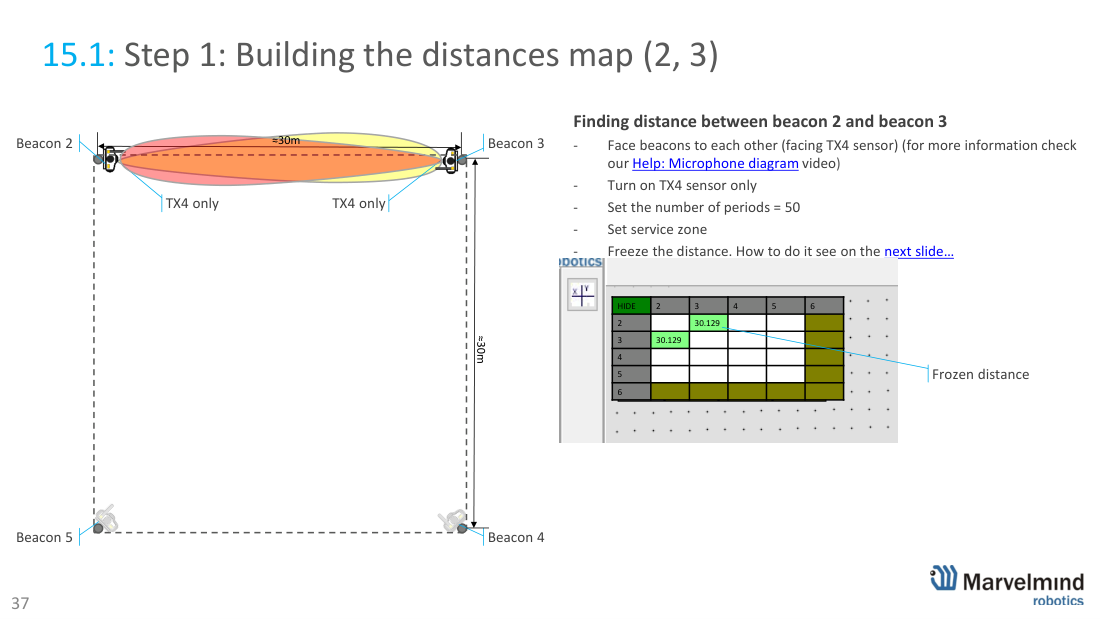
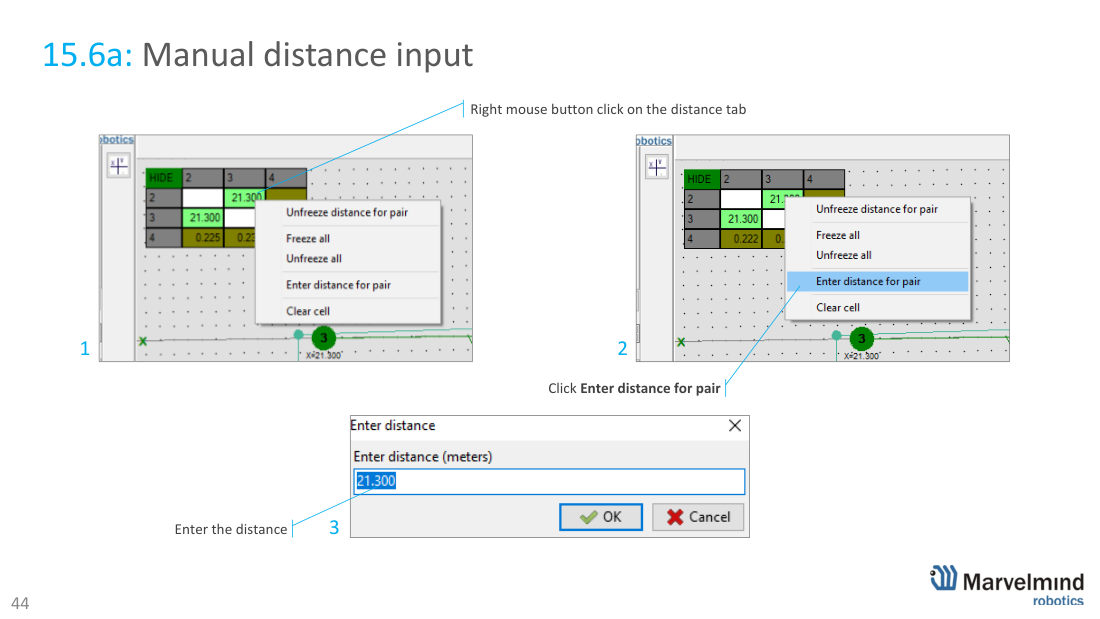
Because 30 m exceeds the auto-measurement comfort range, you build the distances map pair-by-pair: face the two beacons (TX4 only), set periods = 50, raise distance limits (~45 m), then freeze the distance for the pair (right-click the distance cell → Freeze distance for pair). Repeat for pairs (2,3) (3,4) (4,5) (2,5) (2,4) (3,5). For distances that are hard to auto-measure, enter them manually (laser/tape).
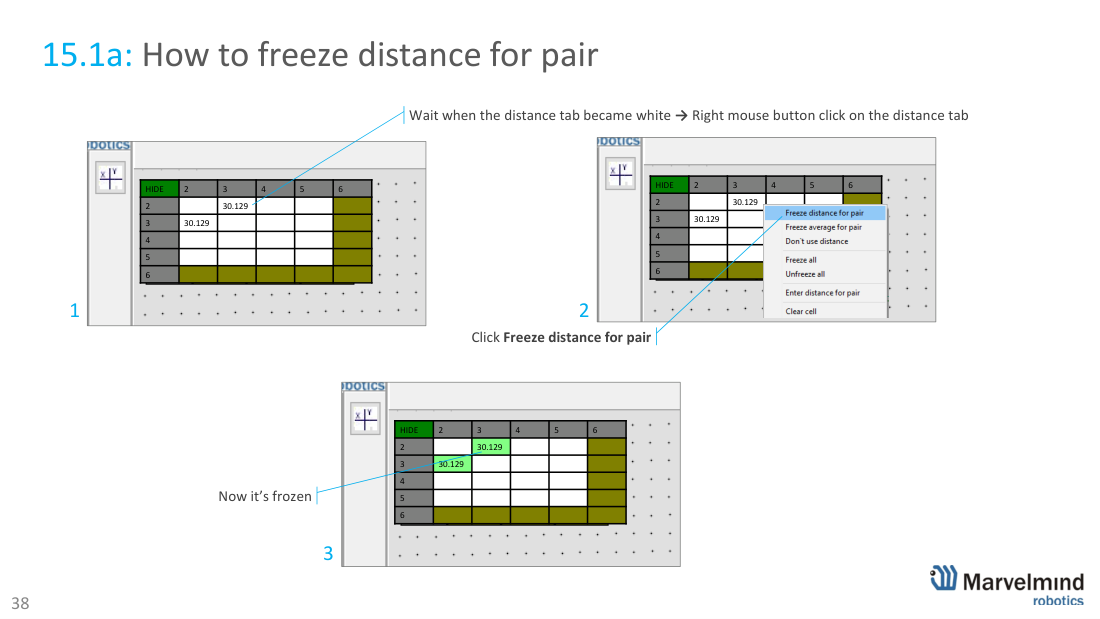
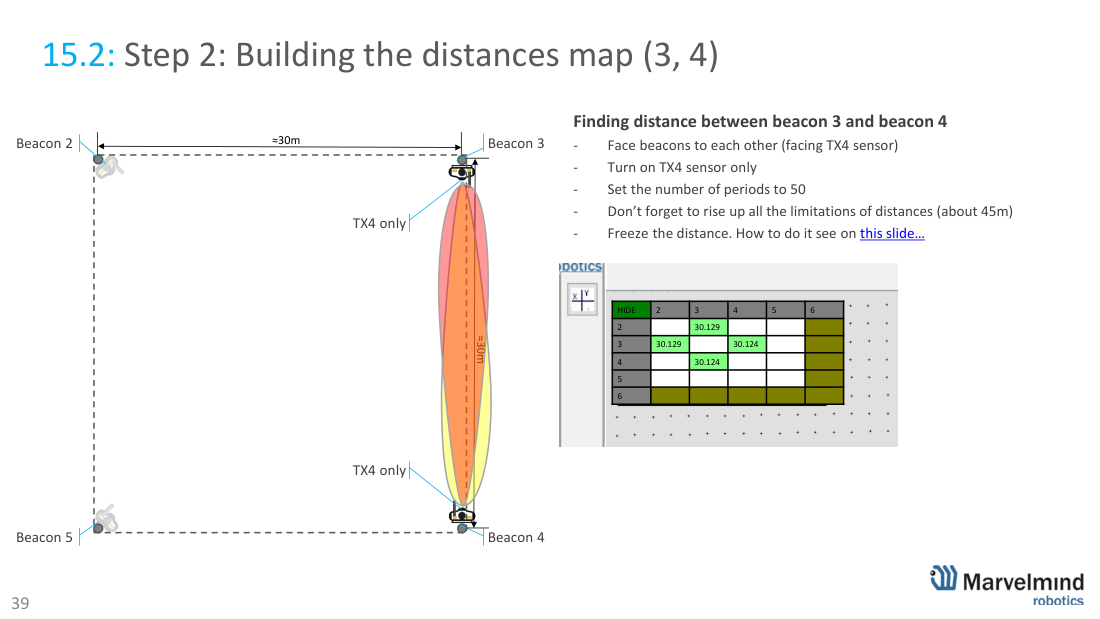
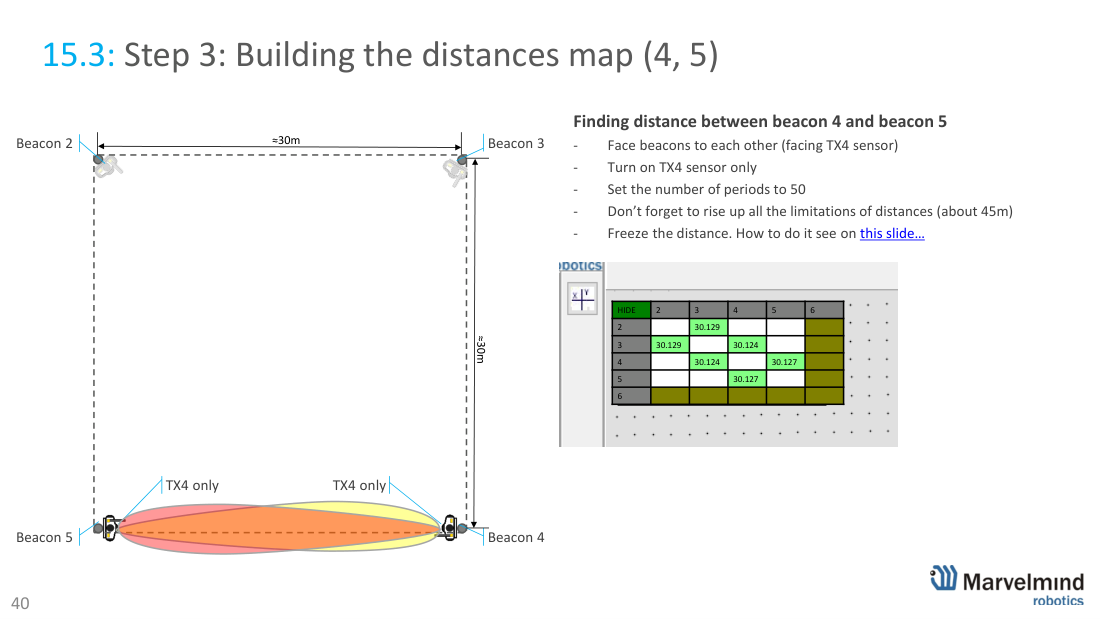
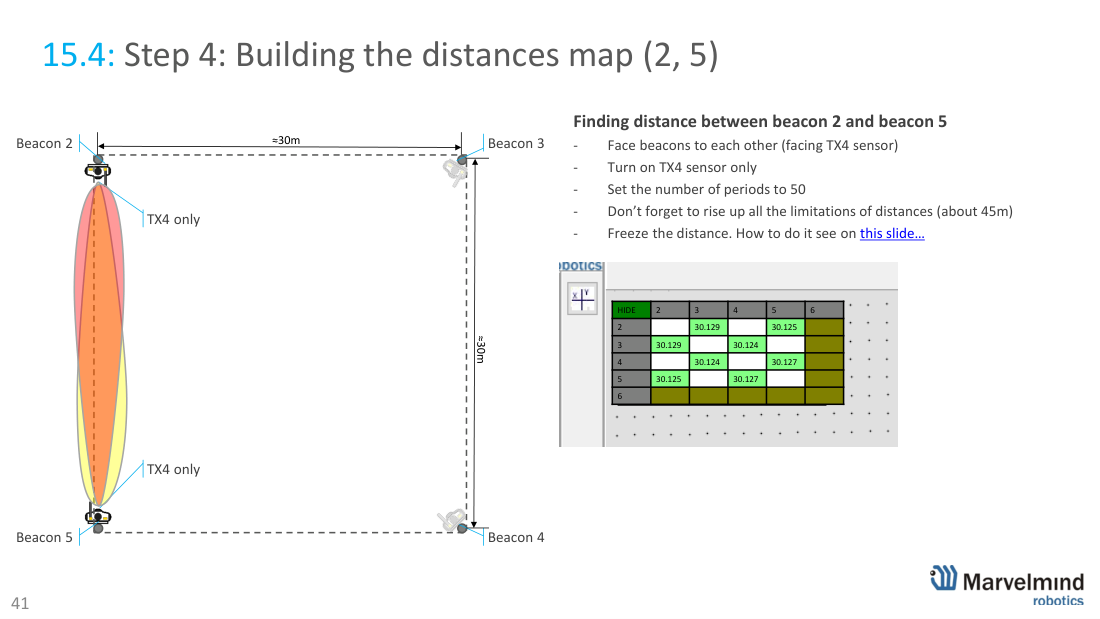
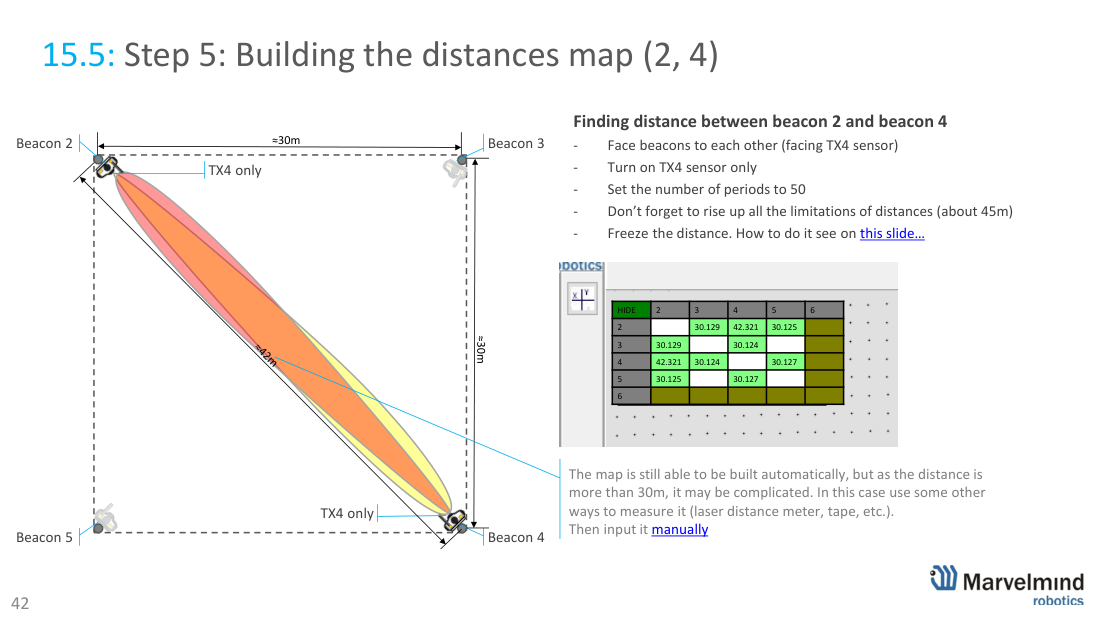
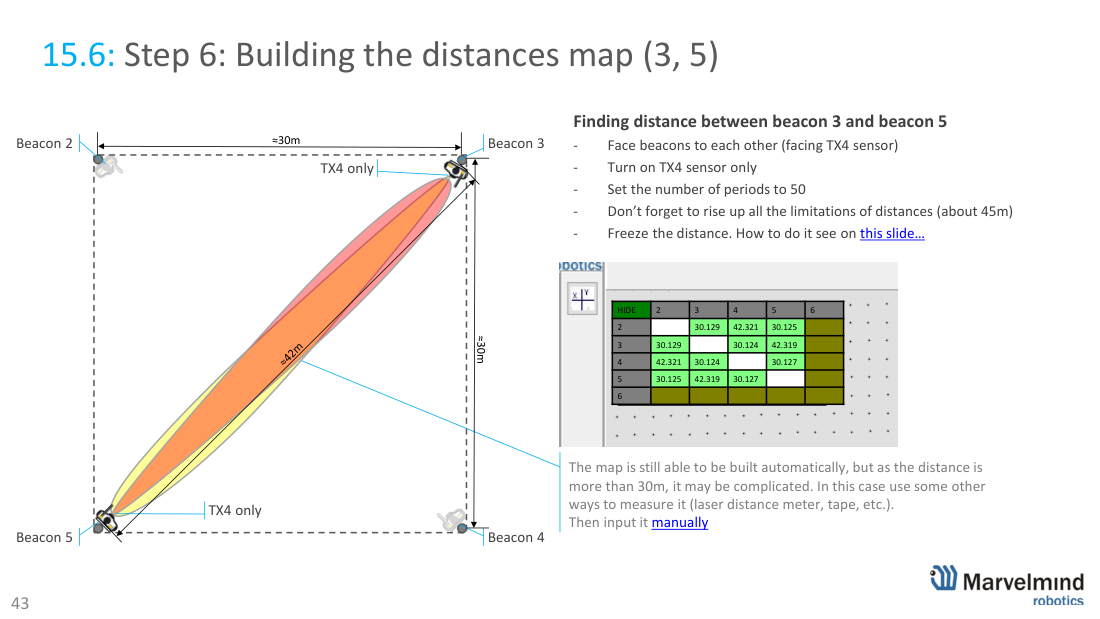
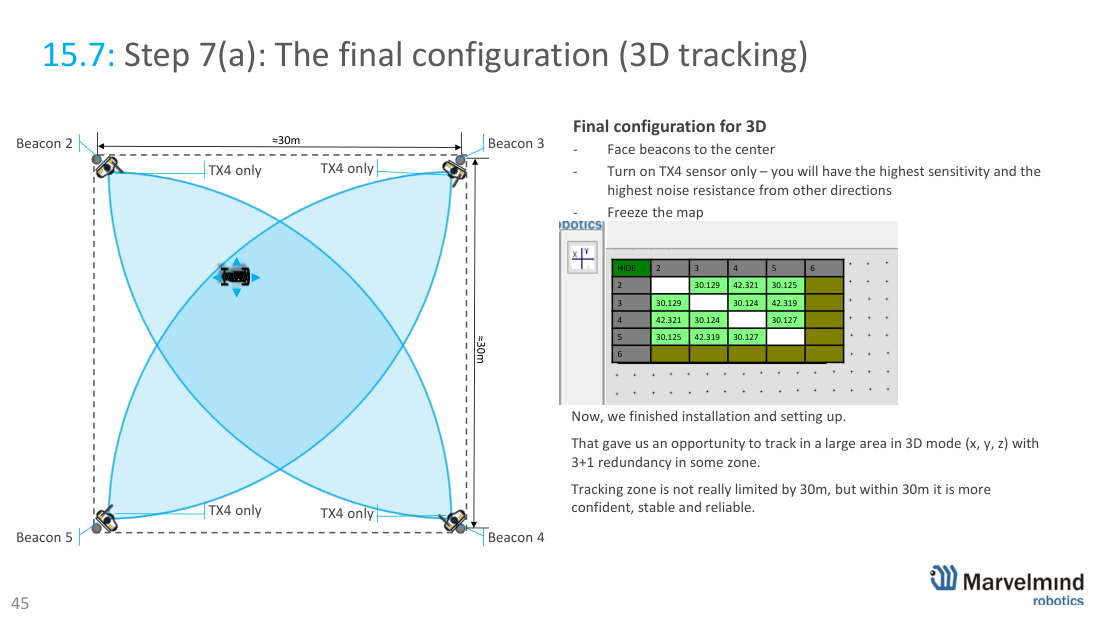
Final configuration: face all beacons to the centre (TX4 only) and freeze the map. 3D gives X,Y,Z with 3+1 redundancy; 2D gives a larger coverage area (no Z, no redundancy). Tracking isn’t hard-limited to 30 m but is most stable within it.
16 · Legacy Starter Set HW v4.9
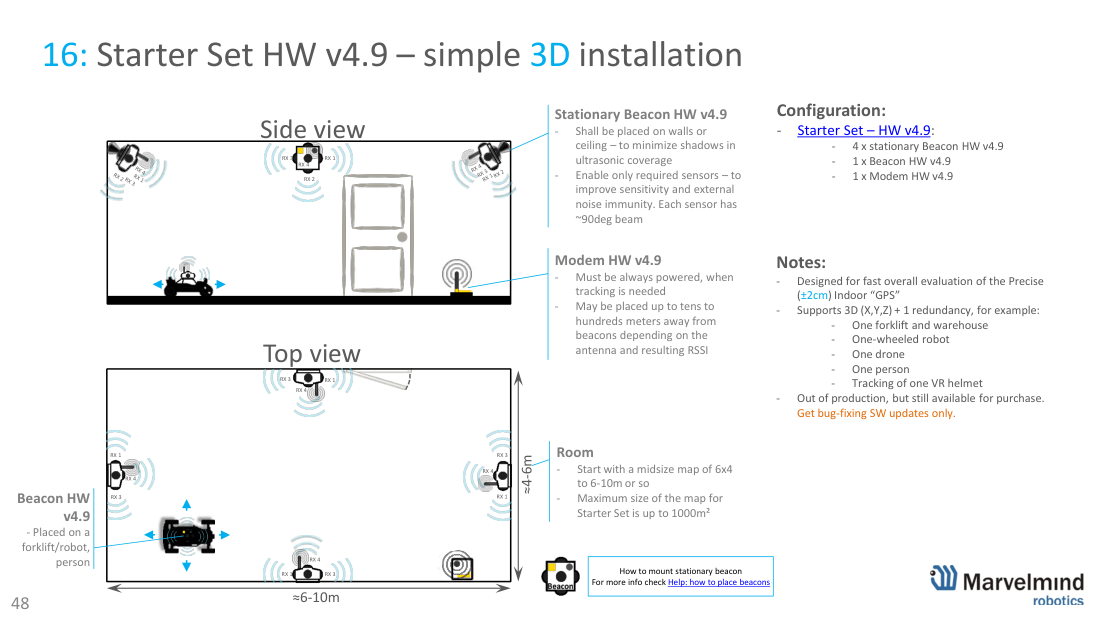
Legacy: Starter Set HW v4.9 – simple 3D installation. The previous-generation starter set (4× stationary + 1× mobile Beacon HW v4.9 + Modem HW v4.9) for fast 3D evaluation. Out of production but still available for purchase; receives bug-fix SW updates only. New projects should use the current Starter Set Super-MP-3D.
17 · Contacts and support
Need help with beacon placement for your space? Marvelmind Help and AI assistant · Marvelmind YouTube channel · FAQ · email info@marvelmind.com. Ready to order? See the beacons, modems and full shop (prices shown).
Authoritative source: Placement Manual (PDF) · Operating Manual (PDF) · all downloads.